Iceland - Patch (23.20.6)
This Iceland patch release fixes several costing and pricing issues. Changes, service search and add-ons all work reliably again in Classic Costings. Add-on unit prices and manual add-on prices in the Itinerary Builder are now calculated correctly, and the Lightning Costings summary shows per-person totals for each itinerary group. For teams booking groups, it also adds opt-in pilot features in the Itinerary Builder. These can size room lines from the group, assign lines to itinerary groups, and keep manual prices consistent when dates or quantities change.
Add-on Unit Prices Follow the Add-on's Own Quantity and Dates (KT-15855)
[Carr Golf] Unit prices are calculated incorrectly Price Lines Add-on prices in Costings now follow the add-on itself. The unit cost and unit price of an add-on are calculated from the add-on's own quantity and the length of its own dates. A short add-on on a longer service is no longer priced as if it lasted for the whole service. If an add-on has no dates of its own, the service's dates are used.
Classic Costings Changes Saved Outside Fast Edit (KT-15854)
[Carr Golf] Classic Costings: changes outside Fast Edit mode are not saved Changes made in Classic Costings outside Fast Edit mode are saved straight away again, so they are no longer lost when the page is refreshed. This covers deleting and copying lines, the gear menu actions (add-ons, price category or meal plan, notes and recalculate), external names, dates, quantities, group assignments, prices and other costings fields. Fast Edit mode and Lightning Costings are unchanged.
Smart Room Quantities in the Itinerary Builder (Pilot) (KT-15853)
[Carr Golf] Builder: Room quantity requires manual entry per room instead of auto-calculating from group size Itinerary Builder When you add a new room in the Itinerary Builder, the number of rooms can now be set automatically. It is calculated from the itinerary group size and the maximum occupancy of the selected price category, rounded up. For example, a group of eight adding a double room (maximum occupancy 2) starts at four rooms. Users can still change the quantity. This is a pilot feature and stays off until a Salesforce administrator enables it. Both of the following steps are required for each user who adds rooms in the Builder: - Assign the permission set (Kaptio) Pilot Features to the user. - On the active User Setting for the user (user, profile or organisation level), add SmartRoomQuantities to the Pilot Features field. If either step is missing, a new room starts at quantity 1 and the Builder works as before.
Service Search in Classic Costings (KT-15851)
[Carr Golf] Classic Costings: text search returns error when adding service Searching for a service in Classic Costings works again when multilingual search is enabled, which is the default. Previously, typing in the Search box of the Add Service dialog showed an error and returned no results. Users could not add services to itineraries that use Classic Costings. Search results continue to respect each service's visibility settings and the selected location filter.
Add-ons on Classic Costings Lines (KT-15850)
[Carr Golf] Reinstate Addon___c and IsAddon__c fields on Itinerary Item Classic Costings supports add-ons on itinerary items again. You can add an add-on to a booking and recalculate existing bookings that already include add-ons. Add-on lines keep the add-on's name, unit of measure and tax treatment. The add-on shows on invoices, passenger lists, itinerary titles, vouchers, content documents, the agenda and supplier requests sent from the Classic Bookings page. An add-on that is still used on an itinerary item cannot be deleted.
Manual Prices Kept When Dates or Quantity Change (Pilot) (KT-15846)
[Carr Golf] Change manual prices behaviour Costings (Lightning) Itinerary Builder When a user changes the dates or the quantity of a service in Costings or the Itinerary Builder, the manual unit price they entered is now kept. The manual cost and sell totals are updated to match the new dates and quantity. This also applies to add-ons and to the add-on prices shown in the Builder. This is a pilot feature. To enable it for a user, assign the permission set (Kaptio) Pilot Features and add RecalculateManualTotals to the Pilot Features field on the user's active User Setting. Users without the pilot keep the previous behaviour, where the earlier manual totals are carried forward unchanged.
Itinerary Group Totals on the Lightning Costings Summary (KT-15845)
[Carr Golf] Itinerary Group section missing from Lightning Costings summary Costings (Lightning) The Lightning Costings summary now shows a Guest/Itinerary Group section under Totals. For each itinerary group, it shows the group name, the number of people in the group, and the total amount and total profit per person. The figures are the ones already stored on each group. If an itinerary has no itinerary groups, a single All Guests row is shown, based on the itinerary totals and group size. The passenger allotment table is unchanged. 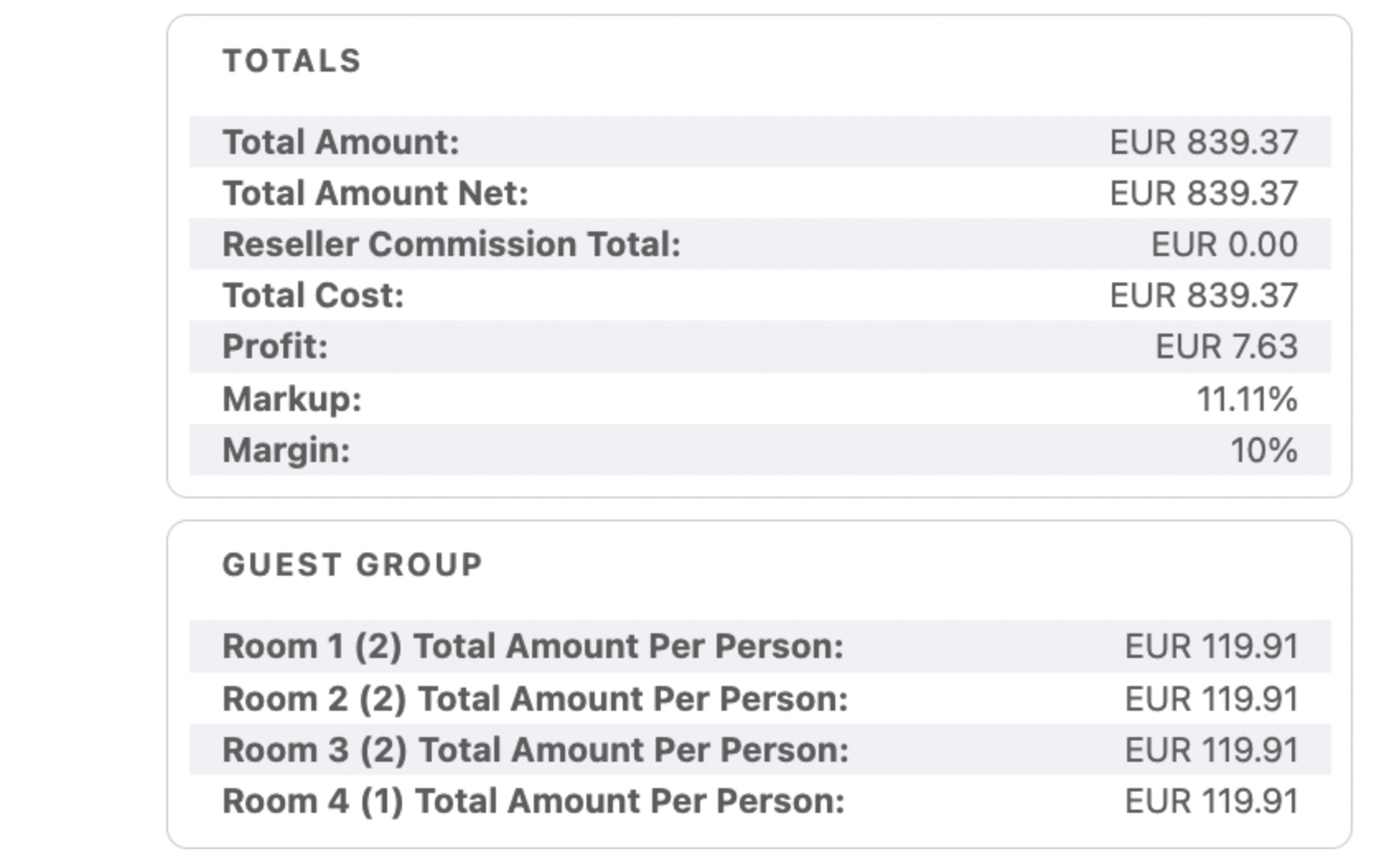 **How to configure** 1. Go to Kaptio Settings > Costings Layout and open the layout used for Lightning Costings. 2. In the Guest Group section, choose which fields to show: * Amount Per Person: shows the amount per person for each group. * Profit Per Person: adds a profit row beneath each group's amount.  3. To remove the section from the summary, hide both fields. 4. To change the section heading, rename the label (for example, to Itinerary Group). 
Add-on Manual Prices in the Itinerary Builder (KT-15843)
[Carr Golf] Builder doesn't show the add-on's manual price Itinerary Builder The add-ons list in the Itinerary Builder now shows the manual sell price already saved on an add-on. Previously, it was replaced with the catalogue price when the add-ons popover opened. When the same add-on is added more than once, each copy shows its own price.
Itinerary Groups on Itinerary Builder Lines (Pilot) (KT-15842)
[Carr Golf] Builder lines can be assigned to itinerary groups behind a pilot setting Itinerary Builder Lines in the Itinerary Builder can now be assigned to one or more itinerary groups using the new Assign Groups action. The line's quantity and passengers are then calculated from the assigned groups, in the same way as in Classic Costings. For example, an activity can be booked only for the travellers in one group. 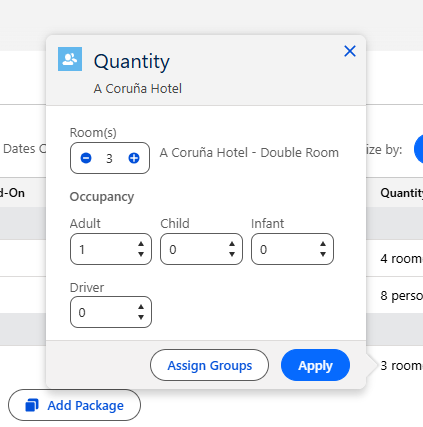 Passengers can move between itinerary groups, and a group's membership can change, on the Passengers tab. When this happens, switch on Set existing lines to new group quantity in the Manage Itinerary Groups dialog. The affected Builder lines are then refreshed in one step, so their quantity, passengers and group totals match the new groups. Previously, a change to a passenger's itinerary group left the group total out of date until the costing was adjusted manually. 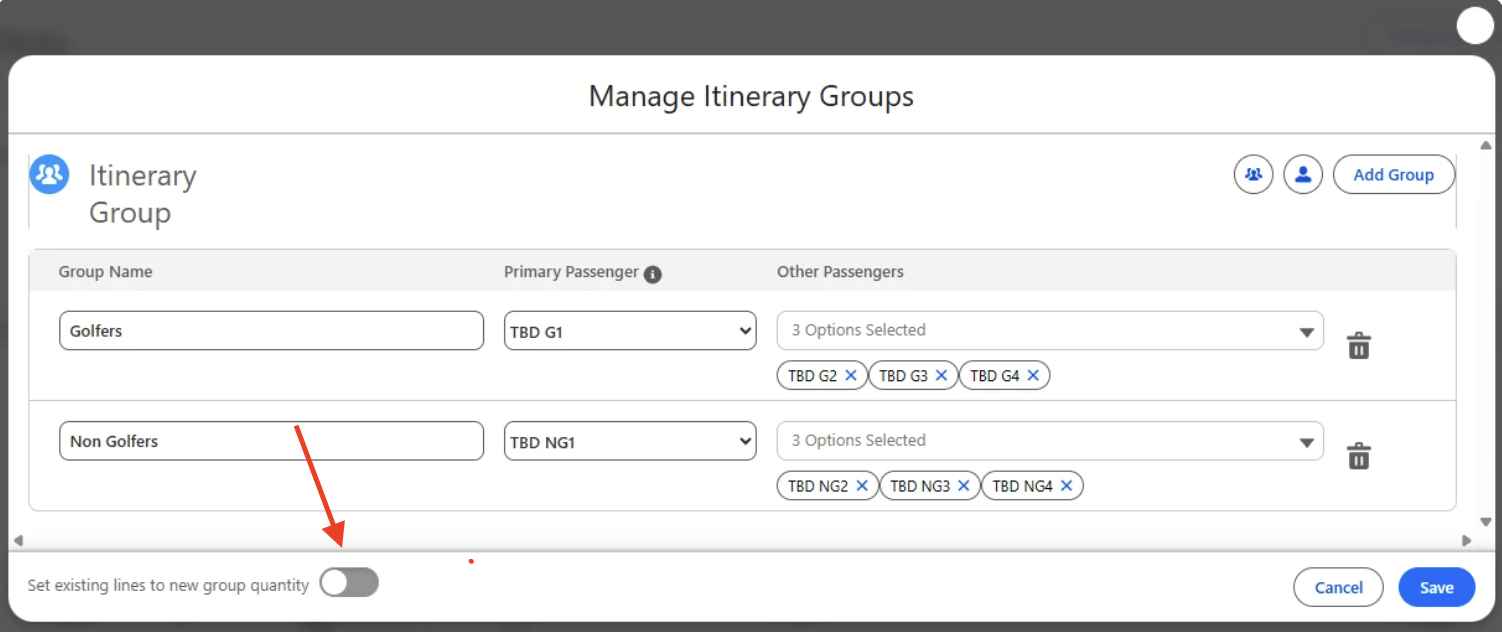 This is a pilot feature. To enable it, add BuilderItineraryGroups to the Pilot Features field on the organisation-level User Setting. Then assign the permission set (Kaptio) Pilot Features to each user who works with itinerary groups in the Builder. The organisation-level setting ensures that every save keeps the groups assigned to a line.