Hawaii - Minor (22.7)
Kaptio is proud to announce this minor release for Hawaii. This release is intended to address issues with previous releases.
Enable swapping in modify mode (ST-1998)
Enable swapping in modify mode Booking Wizard The **Booking Wizard JSON Configuration String** now supports additional properties that allow overriding the default restriction on **Passenger Swaps** in **Modify Mode**. 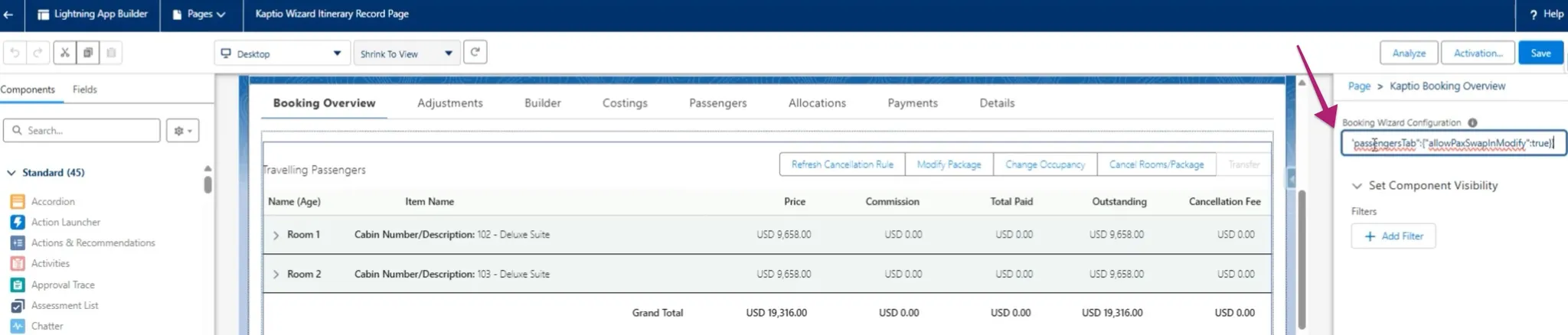 When the feature is disabled, the "swap" icon in Booking Wizard is disabled for all passengers in Modify mode. If the setting "allowPaxSwapInModify" is enabled, passenger swaps will be enabled in Booking Wizard when Modifying. 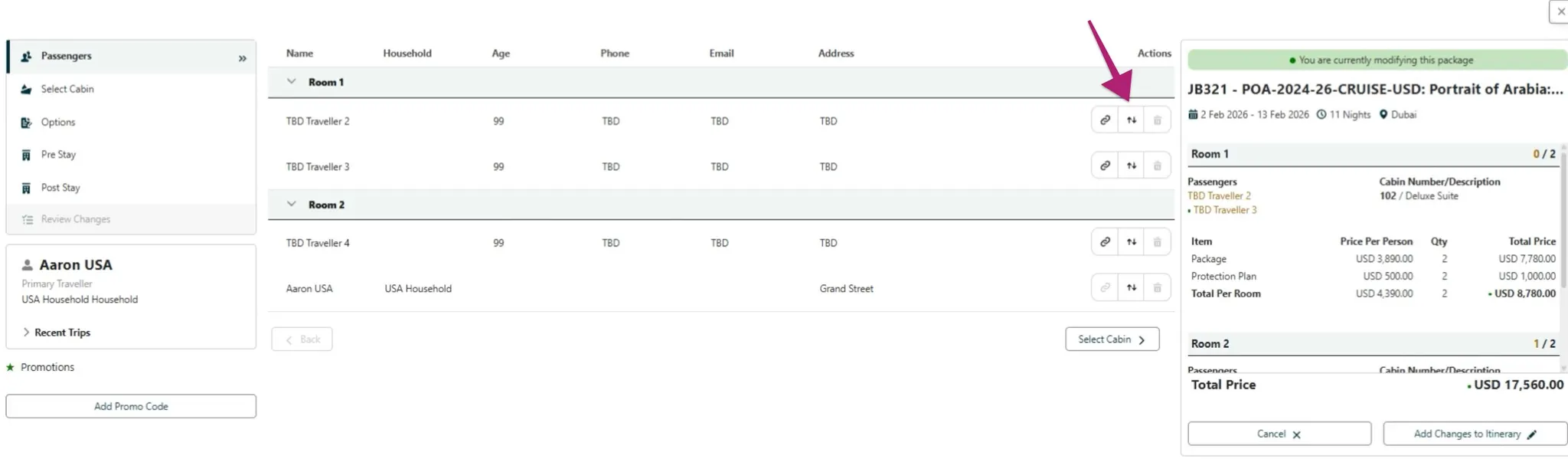 Swapping functionality in Modify Mode now works as expected i.e.: * When swapping between two rooms, new Reservation Numbers are assigned only to passengers in the rooms involved in the swap; all other passengers remain unchanged. * Payments made by swapped passengers are correctly transferred between rooms along with the respective passengers. * Transfer Mode continues to block swapping (linked passengers cannot be unlinked). * Swapping in Change Occupancy continues to function as expected. * If Adjustments are applied, they move between rooms with the corresponding passengers. **NOTE:** When a room involved in a swap has a promotion applied, the promotional effects (per person or per room) are expected to correctly apply to the swapped passengers. However, since promotions in Modify Mode are not yet fully implemented, this functionality will need to be tested in a future phase.
Child discount - Populate fields on PIUA defined in datamodel changes and received from FE (ST-1212)
Child discount - Populate fields on PIUA defined in datamodel changes and received from FE Promotions Extended the booking system to fully support passenger-level promotion applications alongside existing room-level promotions
Show Passenger Level (Child discount) promo in Booking Overview (ST-2009)
Show Passenger Level (Child discount) promo in Booking Overview Promotions Enhanced **Booking Overview** to correctly display promotions applied at the **Passenger Unit Assignment** level, including their associated price line effects. Promotions such as **Child Discount**, when eligible and shown in the Booking Wizard price summary, now appear under the corresponding **Tour** row in Booking Overview with the expected indented star indicator and accurate discount values.
Occupancy handling in booking wizard requests (ST-2060)
Occupancy handling in booking wizard requests Promotions We now pass the actual room occupancy set in Booking Wizard rather than from Package Search
Occupancy shown as Unknown on Allocations Tab (ST-924)
Occupancy shown as Unknown on Allocations Tab Booking Wizard When creating an itinerary via Package Search using a household account, the occupancy and passenger assignment details for **Protection Plan** and **Bedding** components are not displayed as expected. On the **Allocations tab**, these components show the occupant type as **"Unknown"** instead of **"Adult"** or **"Child"**. Additionally, on the **Costings tab**, clicking the occupancy icon next to these components fails to display the associated passenger name in the **Passenger** column. This issue affects clarity and traceability of optional component allocations.
When a package includes Room Up or hotel choices, the Modify Package flow displays the package price from different service level (ST-1307)
When a package includes Room Up or hotel choices, the Modify Package flow displays the package price from different service level Booking Wizard Fixed an issue that when in Modify mode, the pricing summary shows the correct price that corresponds to the applicable service level (and price category).
Promotion tiles spill over Booking Wizard (ST-1472)
Promotion tiles spill over Booking Wizard Booking Wizard Fixed a **layout issue in Booking Wizard** where multiple promotion tiles (auto-applied or manually entered promo codes) would overflow or spill outside the visible area in the Pre/Post Stay tab. The promotion section now dynamically adjusts to display multiple promotions correctly without layout distortion.
Modify package - Unable to remove pre and post if it is sold out (ST-1479)
Modify package - Unable to remove pre and post if it is sold out Booking Wizard Fixed an issue in the **Modify Package** flow where users were unable to remove or adjust **Pre- or Post-Stay services** when those services were marked as **Sold Out (SO)**. Previously, once a Pre or Post stay was sold out, the related options became disabled, preventing users from reducing the number of nights or removing the stay entirely during modification. With this fix, users can now correctly update or remove Pre/Post-Stay services in the Modify Package flow, even if the service is sold out, ensuring booking adjustments behave as expected.
(Temp Hold) cannot hold available cabins (not offered for selection in Booking Wizard) (ST-1731)
(Temp Hold) cannot hold available cabins (not offered for selection in Booking Wizard) Booking Wizard Fixed issue where available cabin would not be returned when inventory is low.
Error on fast selecting/deselecting options in Pre/Post stay (ST-1807)
Error on fast selecting/deselecting options in Pre/Post stay Booking Wizard Added spinner when users select or unselect Pre Stay or Post Stay options
When two concurrent sessions are opened the Booking Wizard is opened for both after message about not available inventory is visible (ST-1976)
When two concurrent sessions are opened the Booking Wizard is opened for both after message about not available inventory is visible Booking Wizard Fixed an issue in **Booking Wizard** where, in concurrent sessions, the wizard would still load after an availability conflict occurred. When two users (or tabs) attempted to book the same cabin simultaneously, the system correctly displayed an error message but proceeded to load the Booking Wizard anyway. The flow has been updated so that the Booking Wizard no longer loads when the selected cabin is already taken, preventing unnecessary errors and maintaining correct booking behaviour.
Multiple errors related to inventory after an expected error in CO/Modify (ST-1943)
Multiple errors related to inventory after an expected error in CO/Modify Booking Wizard Fixed an issue in **CO/Modify mode** where once a handled error was triggered during **Pre/Post Stay** selection (e.g., choosing an invalid room configuration), the error state could not be cleared and subsequent valid selections continued to display multiple or inconsistent errors. The logic has been updated so that after an error is cleared, users can now correctly select a valid Pre/Post Stay option without further issues.
Activity Level is not displayed in package search expanded result (ST-1267)
Activity Level is not displayed in package search expanded result Package Search Resolved an issue in **Package Search** where the **Activity Level** field was not displayed in the expanded search results for packages (e.g., MO, ITS, RYX). The field now correctly appears when viewing detailed search results, ensuring users can see the activity level information as expected.
Multiple this.refs errors in console loading Package Search Availability. (ST-2146)
Multiple this.refs errors in console loading Package Search Availability. Package Search Added microtask to render this.buildProperties ONLY once the DOM has successfully loaded. This prevents multiple errors showing in the developer console when in Package Search > Availabilities.
When a package includes RoomUp, the RoomUp service level line item doesn't appear in both Booking overview and Builder tab (ST-1856)
When a package includes RoomUp, the RoomUp service level line item doesn't appear in both Booking overview and Builder tab Booking Overview Resolved an issue where creating a booking for **MI 2025 – Grad Hotel Lake View** (or similar itineraries) failed to generate the expected **Room Up Service** line item in the Builder tab. Previously, when users selected a **Lake View** service level, added mandatory components, and proceeded through the booking flow, the itinerary was created without the associated service-level line item. The logic has been updated to ensure that the **Room Up Service** line item is consistently created as expected for all applicable service levels during booking creation.
GoT Auto-Apply Promotion remains applied after un-assigning all passengers in Booking Wizard (ST-1980)
GoT Auto-Apply Promotion remains applied after un-assigning all passengers in Booking Wizard Promotions Resolved an issue in **Booking Wizard** where the **GoT Auto-Apply promotion** remained attached to a room even after all passengers were removed. Previously, once the promotion was automatically applied upon entry from a qualifying contact, it could not be cleared unless the promotion was re-triggered elsewhere. The system now correctly removes the promotion when no eligible passengers are assigned, ensuring passenger-based promotions behave as expected.
Promotion description is not visible in the Package Search (ST-2034)
Promotion description is not visible in the Package Search Promotions The promotion popup is now visible in the Package Search.
Promotion Name visible in the Booking Overview instead of the External Name (ST-2045)
Promotion Name visible in the Booking Overview instead of the External Name Promotions Fixed an issue in **Booking Overview** where the **Promotion Name** was displayed instead of the **External Name** for applied promotions. The interface now correctly shows the External Name, ensuring consistency with the promotion details visible to users and external systems.
After the transfer departure the inventory remains in the reserved count even though the new itinerary is created with active booking status (ST-2004)
After the transfer departure the inventory remains in the reserved count even though the new itinerary is created with active booking status Inventory Fixed an issue in the **Itinerary Transfer** process where, after transferring an active booking to a new departure date, the associated **inventory units** were incorrectly left in a **Reserved** state instead of being moved to **Booked**. With this fix, when an itinerary is successfully transferred, the inventory for the new departure is now properly deducted from **Available units** and reflected as **Booked units**, ensuring accurate inventory tracking across transfers.
Waitlists: incorrect results returned for Check avail. when Package has Service levels (ST-2066)
Waitlists: incorrect results returned for Check avail. when Package has Service levels Waitlist Fix issue of displaying incorrect result when package has service level