Galapagos - Patch (21.22)
Kaptio is proud to present this new Patch Release for Galapagos.
Booking Conversion Service (ST-921)
Booking Conversion Service Booking Wizard This change includes the support for incorporating Inventory Reserve/booking actions into Existing Booking Flow. It will enable us to support Tauck's requirements for temporary hold, reservation, and booking of inventory allotments. The change is primarily affecting Accommodation Services with Inventory Status=Allotment. **How to enable:** To enable the feature, in Kaptio Settings-User Overrides, add "BookingFlowInventoryReserve" to Pilot Features: 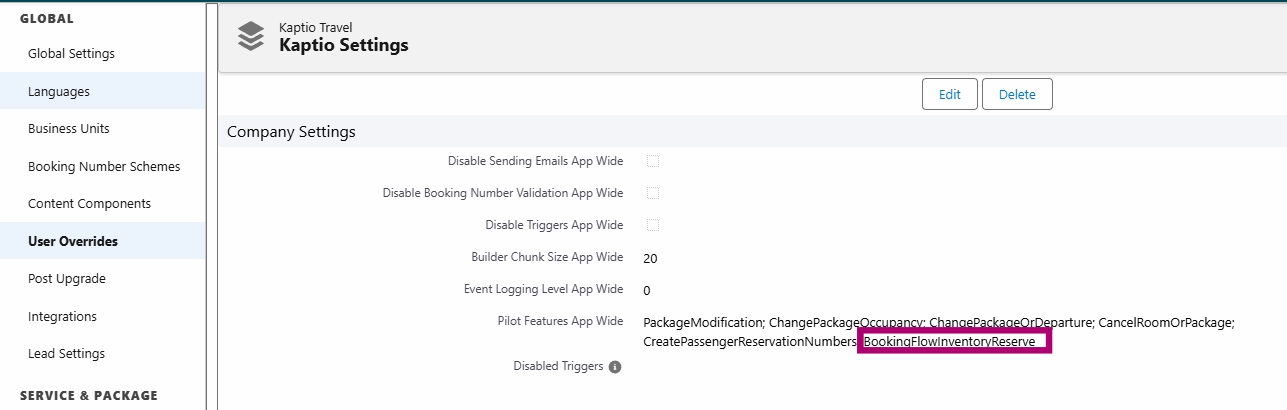 If the feature is not enabled, the functionality will be unchanged (same as before this change was introduced). **How it works:** If the setting is not added to Pilot Features, inventory reservation will be handled as usual, meaning that adding the Accommodation Services with Inventory Status=Allotment (e.g. Pre-Stay) will result in corresponding Itinerary items, but the units will not be reserved until the agent manually reserves/books the inventory: 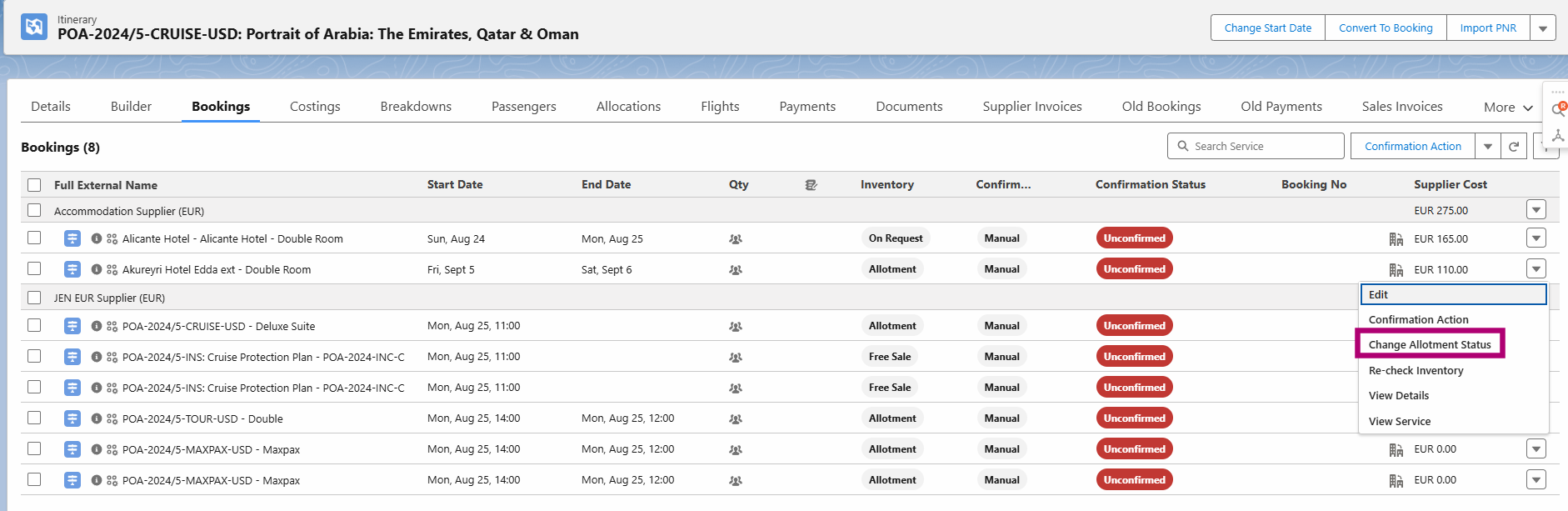 In this case, the respective Itinerary items will have the following properties: - Allotment Action, Allotment Status and Allotment Status ID will be *null* - No ItineraryItemAllotmentDay__c junction records will be created - Allotments table will remain unchanged (no inventory reserved) If the sales agent manually reserves or books the inventory, these values will change to: - Allotment Action=Reserve/Book - Allotment Status=Reserved/Booked - Allotment Status ID=0/1 - ItineraryItemAllotmentDay__c junction record will be created for each affected Itinerary item - Allotments table will be updated accordingly (decreasing the total available unit number) **NOTE:** Accommodation services with Inventory Status!=Allotment (e.g. Live Inventory, On Request, etc.) are unaffected since their reservation is not part of this flow. 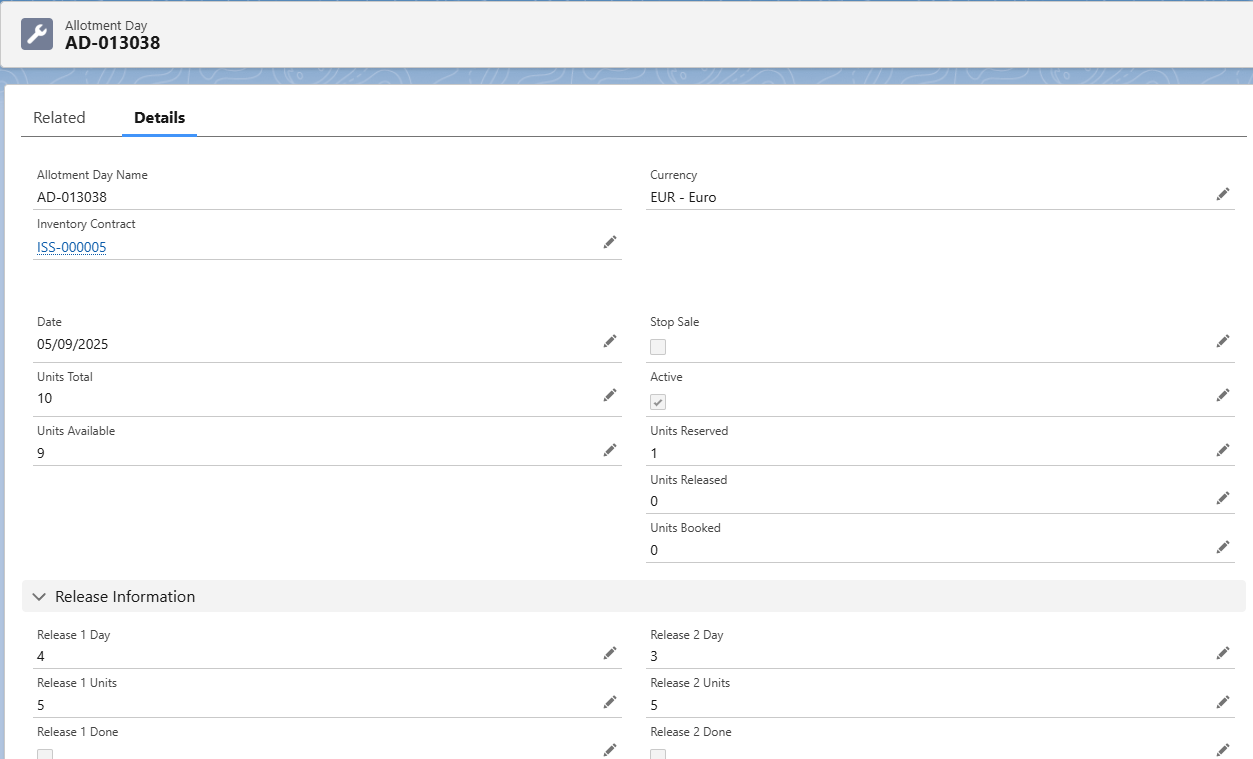 But, with the setting added to the Pilot Features, Accommodation Services with Inventory Status=Allotment will be reserved immediately upon insertion. This means that, as soon an Itinerary is created, including such a service (e.g. Pre or Post Stay), the selected units for these services will be reserved automatically. These itinerary items will be created with following properties: - Allotment Action=Reserve - Allotment Status=Reserved - Allotment Status ID=0 - ItineraryItemAllotmentDay__c junction record will be created for each affected Itinerary item - Allotments table will be updated accordingly (decreasing the total available unit number) **NOTE:** The above applied only to Accommodation Services with Inventory Status=Allotment. **Itinerary Item Allotment Day:** This record is created for every itinerary item that is reserved or booked: 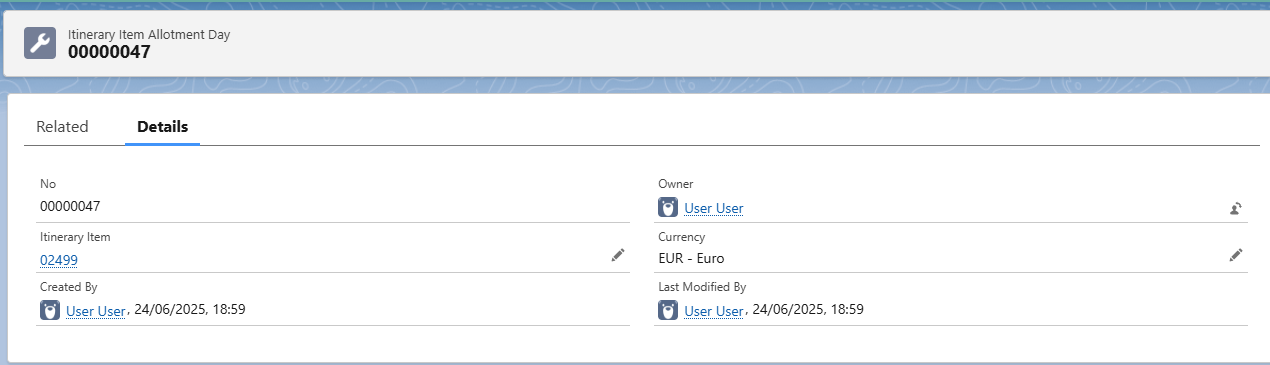 This object is a junction between Itinerary item and Allotment Day: 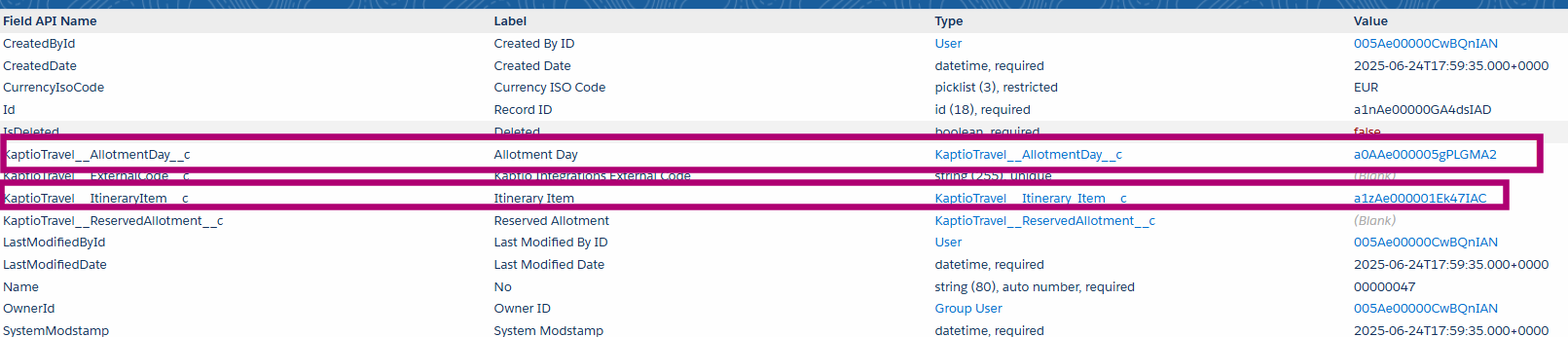 Allotment Day record is the relationship to the specific Inventory Contract and holds the details on the inventory availability, release statuses, etc: 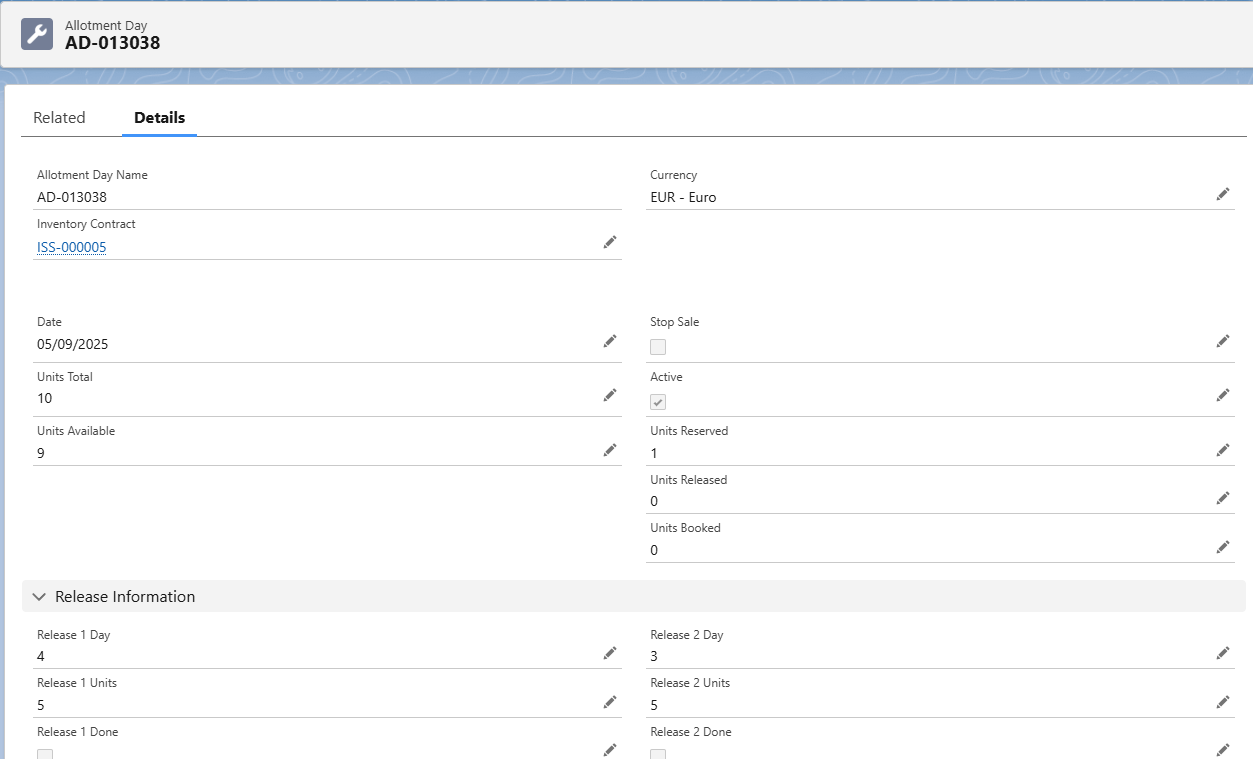 **Additional Notes:** Assuming that the setting "BookingFlowInventoryReserve" is active: - When an Itinerary with reserved inventory is converted to Booking, inventory statuses will change to Booked. - When a payment is made against the itinerary with reserved inventory, inventory statuses will change to Booked. - In Modify mode, newly added services will be treated as new. If an existing Pre/Post Stay service is replaced with another, the replaced service will become Cancelled: Allotment Action = Cancel, Allotment status = Cancelled, Allotment Status ID=2, its ItineraryItemAllotmentDay__c junction records are deleted, InventoryJSON__c is correctly updated. The Service selected instead of the replaced one will be treated as new. - In Cancel mode, services will be cancelled. - In Transfer mode, all services in the source itinerary will be cancelled, while the resulting itinerary will be treated as new itinerary. - When an Itinerary with Pre/Post stay services with Inventory Status=Allotment (and reserved/booked inventory) is cloned, the resulting services will not be reserved automatically (because these were not created via Booking Wizard). - If the Amendment process is initiated for an Itinerary with Pre/Post stay services with Inventory Status=Allotment (and reserved/booked inventory), the resulting services will not be reserved automatically (because these were not created via Booking Wizard). - If there is a Flow configured for Lapse itinerary (e.g. configured in such a way that, on a specific date, reserved inventory becomes cancelled), respective units will become Cancelled.
Itinerary Transfer Event State Control (ST-1167)
Itinerary Transfer Event State Control Itinerary Builder This enhancement introduces comprehensive state tracking for itinerary modification operations including transfers, cancellations, and changes. The system now provides real-time visibility into the progress and status of modification workflows, enabling better error handling and audit capabilities. **How it works:** The system automatically tracks the lifecycle of itinerary modifications through two new fields: - Transfer Modification Type: Identifies the type of operation being performed (Transfer, Cancellation, or Change) - Transfer Modification Stage: Tracks the current status of the operation (In Progress, Completed, or Failed) **Modification Types:** The system automatically maps booking wizard actions to modification types: - Transfer: Triggered by transfer-package action - Cancellation: Triggered by cancel-rooms action - Change: Default for modify-itinerary, add-to-itinerary, and other modification actions **State Tracking Workflow:** 1. Initialization: When a modification begins, the system sets `TransferModificationType__c` to the appropriate type and `TransferModificationStage__c` to "In Progress" 2. Completion: Upon successful completion, the stage is updated to "Completed" 3. Error Handling: If an error occurs, the stage is set to "Failed" to prevent itineraries from remaining stuck in progress **Frontend Integration:** The Booking Wizard now includes enhanced error handling that: - Initializes modification tracking before starting operations - Marks modifications as failed if errors occur during processing - Handles both single itinerary and transfer scenarios (source/target itineraries) **Technical Implementation:** - New Service Class: ItineraryModificationService provides centralized management of modification state tracking - Controller Integration: BookingWizardController includes new methods initModification() and failModification() - Frontend Enhancement: Lightning Web Component updated with modification state management **Benefits:** - Improved Visibility: Real-time tracking of modification progress and status - Better Error Handling: Failed modifications are properly marked, preventing stuck states - Operational Efficiency: Support teams can quickly identify and resolve stuck modifications **Additional Notes:** - The feature is automatically enabled for all new modification operations - Existing itineraries will have null values for the new fields until they undergo modification - The system maintains backward compatibility with existing modification workflows - Field history tracking is enabled for both new fields to provide complete audit trails KAPI-3039
Always create Fixed deposit rules for packages with Unpriced = TRUE (ST-1115)
Always create Fixed deposit rules for packages with Unpriced = TRUE Itinerary Builder If an itinerary contains an unpriced package, the rules for calculation of the itinerary payment schedule rules are slightly changed: Per-person and Fixed itinerary payment schedule rules retain their values as defined in the Payment Schedule Configuration, even if the itinerary total is 0. Note that, in that case, the balance rule is negative. KAPI-3038
Release inventory job (ST-1159)
Release inventory job Itinerary Builder The scheduled job responsible for releasing inventory was not automatically configured during or after installation. This oversight affects all organizations utilizing the inventory feature. The scheduled job plays a critical role in updating inventory availability by regularly releasing held inventory. We added step "Schedule Midnight Inventory Management Job" to post upgrade setting page that allows admins to schedule inventory management job. 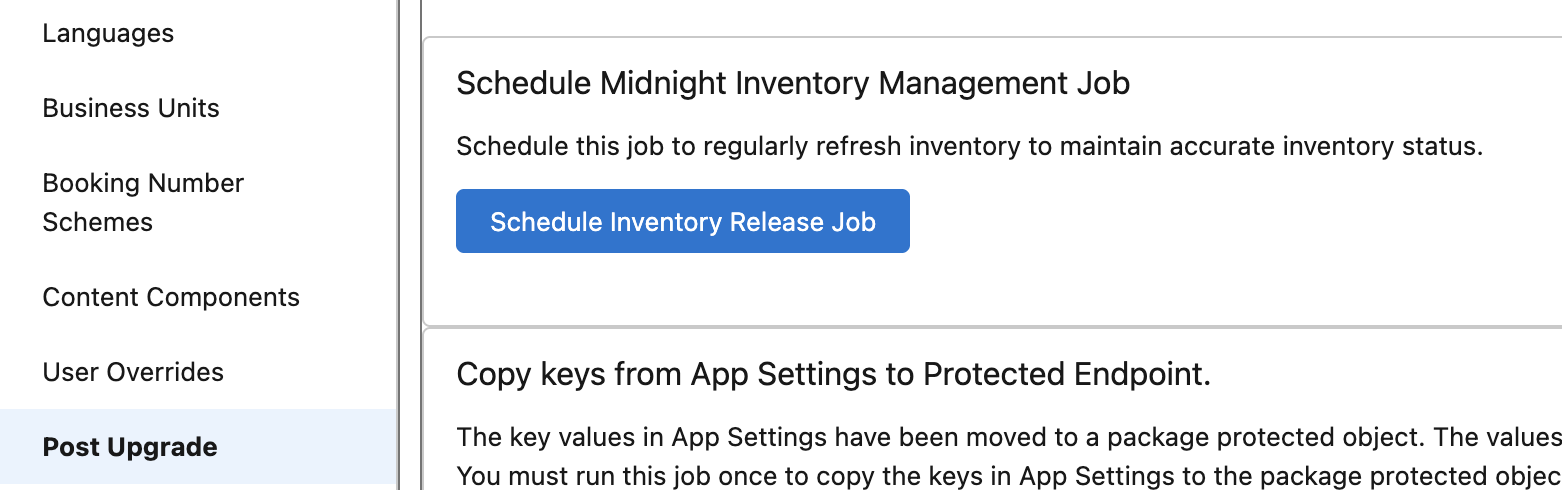
Search feature is currently broken in Booking Wizard in Tauck DEV (Permanent Fix) (ST-1128)
Search feature is currently broken in Booking Wizard in Tauck DEV (Permanent Fix) Booking Wizard A new setting has been added that allows you to specify a custom API Name for Household Account Types (default: "Household"). This setting can be configured via Setup → Custom Settings → App Settings. This is only necessary if your organization uses a custom API name for household accounts. For most customers, no action is required. KAPI-3701
Edit Contact opens up Add Household Member page instead of Edit Page (ST-737)
Edit Contact opens up Add Household Member page instead of Edit Page Itinerary Builder With this fix, clicking the Edit Contact link will now open the standard Salesforce UI to edit a record, unless a custom Flow is specified in the JSON configuration. This JSON configuration is set within the Itinerary Lightning App Builder page (see screenshot below). For more details, refer to the Passenger Grid - Overview feature within the Fiji Major (20.0) Release Notes. 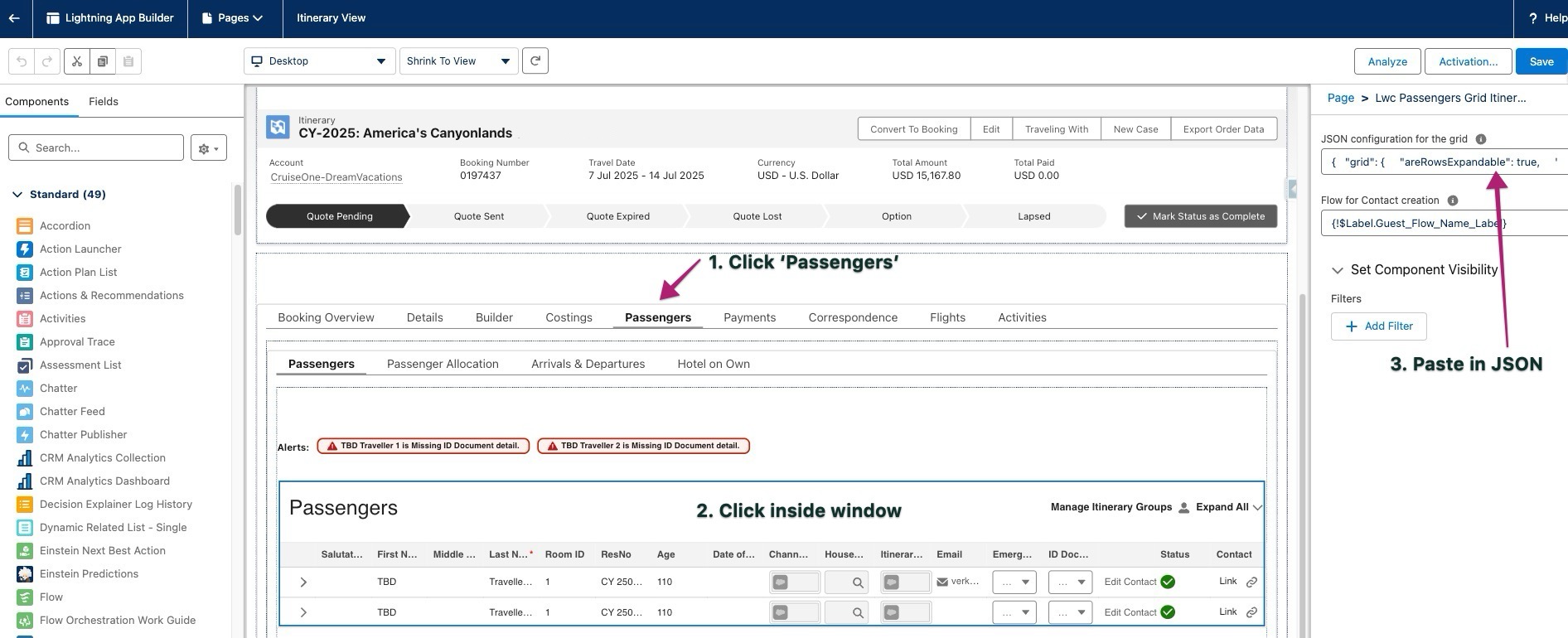 KAPI-3052
Price lines not created when a package is unpriced (ST-945)
Price lines not created when a package is unpriced Itinerary Builder This ticket addresses an issue where price lines were being created for unpriced and core components that belonged to an unpriced package.
Modifying Pre Stay or Post Stay - Adding or Subtracting Rooms Can Change Status of Previously Booked Rooms (ST-1082)
Modifying Pre Stay or Post Stay - Adding or Subtracting Rooms Can Change Status of Previously Booked Rooms Booking Wizard After the fix the system will only add or cancel the specific nights required. This behavior will only apply when `isCreateLinePreNightPerRoom = true`, which is the case where we create an itinerary item for each night. See below examples: 1. When the Pre or Post stay Component has the field `KaptioTravel__CreateItineraryItemPerNightPerRoom__c` **set to true**, the logic will create or cancel only respective itinerary items. When initially adding pre-stay nights, one itinerary item is created per night selected. For example, selecting 1 night creates 1 itinerary item; selecting 2 nights creates 2 items. If additional nights are added later, the same logic applies. If the number of pre-stay nights is reduced (e.g. from 4 to 3), one of the existing itinerary items will be cancelled, and the remaining 3 will remain unchanged. 2. When the Pre or Post stay Component has the field `KaptioTravel__CreateItineraryItemPerNightPerRoom__c` **set to false**, the logic will create only 1 Itinerary item, regardless of the selected number of nights. When modifying the itinerary, adding 1 additional night via Modify mode creates 1 additional itinerary item. If nights are removed, starting with 2 nights, removing 1 night results in 1 itinerary item being cancelled, leaving only 1 night in the Itinerary. **NOTE:** The above applies to both Pre and Post stay components. KAPI-3628
Change occupancy - New res number is created for a room that is not selected and not altered in the flow but we add a new room or change occupancy for other room (ST-972)
Change occupancy - New res number is created for a room that is not selected and not altered in the flow but we add a new room or change occupancy for other room Booking Wizard Resolved an issue in change occupancy process that could cause passenger reservation numbers to be incorrectly shuffled when a passenger was removed from a room. Fixed incorrect rooms ordering in the Booking Overview. KAPI-3455
PaymentGateway record cannot be created through the test class (ST-1135)
PaymentGateway record cannot be created through the test class API Fixed an issue where `PaymentGateway` records could not be created from test classes due to missing External Connection "FieldEncryption" prerequisites. Added a new `GlobalTestDataFactory` class that provides test-visible methods for creating required prerequisite data. **For Test Classes**: Use the new global method to set up prerequisites before creating `PaymentGateway` records: `GlobalTestDataFactory.createProtectedEndpoint('FieldEncryption', 'dummy-secret-key');` KAPI-3775