Iceland - Patch (23.2.11)
This Iceland patch release resolves issues across cancellation, transfer, occupancy, payment scheduling, pricing, and promotion workflows, helping booking totals, retained services, and payment schedules remain accurate through complex itinerary changes. It also improves reliability and responsiveness in passenger management, payments, Package Search, room allocation, and published cancellation documents.
Payment Schedules Preserved After Full Cancellation (KT-15197)
Payments: Full itinerary cancellation deletes all pay-per-passenger schedules Cancellations Payments Fully cancelling a pay-per-passenger booking with four or more rooms through Booking Wizard no longer removes its deposit and balance payment schedules. Existing schedules and due dates are preserved, while the current Payments tab display for cancelled passengers remains unchanged.
Change Occupancy Preserves Services After Transfer (ST-4318)
If the occupancy is reduced after Transfer, the survivor gets the Cruise component replaced Cancellations Transfer Change Occupancy now preserves the correct package services for passengers remaining on an itinerary after another room has been transferred. Reducing room occupancy and cancelling a passenger no longer replaces the survivor’s original cruise component with one from the transferred package.
Passenger Tab Keeps Expanded Sections Open While Editing (ST-4291)
Cherry-pick ST-4240 -> 23.2 (belmond p11) Passenger Grid On the Itinerary Passenger tab, editing a field in an expanded passenger section no longer closes that section. The updated value also remains visible if the section is collapsed and opened again before Save.
Standalone Services Included in Cancellation Calculations (ST-4287)
Canx fee for standalone services excluded from BW in CO and Transfer Booking Wizard Cancellations Standalone services, such as excursions added through the Itinerary Builder, are now included in cancellation penalties and refunds in Booking Wizard for Change Occupancy, Cancel Room, and Transfer. The full cancellation amount is shown per passenger, and Booking Overview now displays standalone cancellation fees correctly for transferred passengers.
Cancellation Totals and Payment Schedules Stay Aligned (ST-4237)
Port ST-4204 cancellation totals fix from C17-END-2 to Belmond P10 Cancellations Payments When a discounted service is cancelled, Booking Overview now shows only the cancellation fee that remains due, including for package services such as pre- and post-stay nights. Payment schedules are recalculated so the amount due matches the updated booking total.
Package Search Displays Accurate Cabin Totals (ST-4208)
Package Search cabin grid room total shows .01 rounding drift for odd passenger counts Package Search The expanded package row in Package Search now displays the correct cabin total for odd passenger counts, preventing a one-cent rounding difference.
Published Documents Open for Fully Cancelled Itineraries (ST-4176)
Cancellation Itinerary document published link fails to render — Group Size 0 rejected by CustomerOutputDto in published path Cancellations Documents Published document links now open correctly when every passenger on an itinerary has been cancelled and the group size is zero. Fully cancelled itineraries are recognised as a valid exception, while active itineraries continue to require a group size greater than zero before their published documents can render.
Room Deallocation Updates Itinerary Group Size (ST-4140)
Group size not updated when a pax is deallocated from a Room Room Allocation Deallocating a passenger from a room through Room Allocation in Booking Overview now recalculates the itinerary's Group Size. The value reflects the current number of active passengers, consistent with Change Occupancy.
Itinerary Details Refresh Immediately After Payment (ST-4139)
Itinerary Not Refreshing when a Payment is taken Booking Overview Payments After taking a payment on an Itinerary, the record page (Status, Record Type, and highlights) now updates immediately without a full browser refresh. You remain on the Payments tab.
Per-Leg Promotions Apply Consistently to Multi-Leg Packages (ST-4138)
Belmond_Discount 100 inconsistent behavior in PS, BW and BO for 2 leg packages Promotions Booking Wizard and Booking Overview now apply fixed-amount, per-leg promotions correctly on multi-leg packages. The promotion is applied once per priced leg, so the total discount is consistent across Package Search, Booking Wizard, and Booking Overview.
Change Occupancy Prices the Final Available Unit Correctly (ST-4137)
When last available option is selected during CO, Itinerary Item is not created Itinerary Items Change Occupancy now prices the last available unit correctly instead of showing $0.
Faster Passenger Editing on Larger Itineraries (ST-4054)
Passengers tab quite irresponsive when number of pax is big Passenger Grid Editing passenger details is now more responsive on itineraries with many passengers. Cells focus more quickly, the editing overlay remains stable, and typing no longer experiences the previous delay on larger passenger lists.
Transfer Fees Carry Forward on Subsequent Transfers (ST-4041)
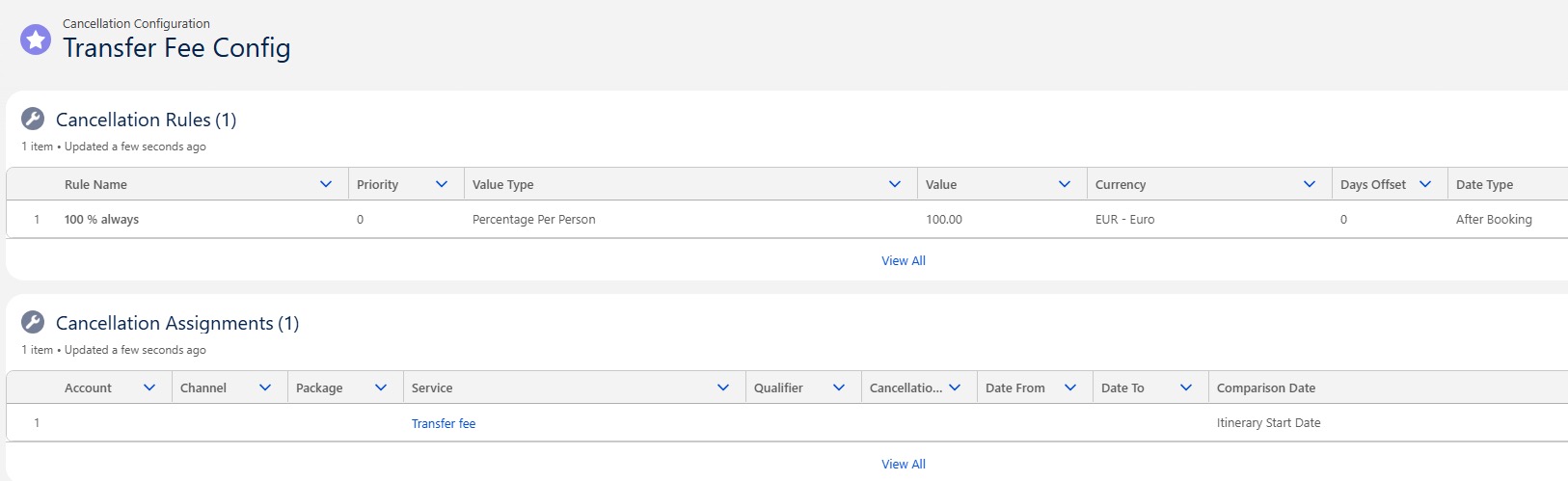
[Transfer package] Transfer Fee not carried forward on re-transfer Transfer When a booking is transferred more than once, accumulated Transfer Fee amounts are now correctly included in the cancellation schedule and carried forward to the new booking. Previously, Transfer Fee from an earlier transfer could be dropped on a subsequent transfer, so the new Transfer Fee was calculated only from package/cabin cancellation fees.  Note: Transfer Fees that are waived during a transfer are not carried forward to subsequent transfers.  This fix requires a specific cancellation configuration for the Transfer Fee service. Configure the Transfer Fee service with a dedicated cancellation rule at 100%. This rule applies each time a passenger is transferred and takes precedence over other cancellation configurations for that service. 1. Open the cancellation configuration for the Transfer Fee service. 2. Add or update a rule that applies a 100% cancellation fee to the Transfer Fee service on transfer. 3. Remove or replace any existing Transfer Fee cancellation rule set to 0%, as this prevents fees from carrying forward correctly on re-transfer.