Hawaii - Major (22.15)
Kaptio is proud to announce this Minor Release for Hawaii. This release is intended to address issues with previous releases.
Adjustments values for inactive passengers (ST-1972)
Adjustments values for inactive passengers Booking Overview Updated the Booking Overview so that adjustments associated with passengers who are moved to inactive/cancelled no longer affect cancellation fees or commissions. When a passenger is marked inactive, their adjustment rows are moved with them and the previous adjustment amount is displayed under Price Before Cancellation to preserve accurate totals. New manual adjustments can still be added for inactive passengers, but in all cases adjustment cancellation fees and commissions are set to 0.
Show Flight Segments on Booking Overview and add support for cancellations (ST-2492)
Show Flight Segments on Booking Overview and add support for cancellations Booking Overview New component was added to the KaptioTravel package which shows the flight segment information and allows to edit PNR, cancel PNR and see canceled PNRs and cancellation fees. To add this, create a new tab or add to an existing tab itineraryAirTickets LWC component and populate the following JSON in configuration: ```json { "permissions": { "System Administrator": { "enableEdit": true, "enableCancel": true, "showCancellationPenalty": true, "excludePenaltyForNonTicketedFlights": false } }, "additional_fields": [ { "label": "Cabin Class", "field": "TravelClass__c" }, { "label": "Status", "field": "Status__c" }, { "label": "Airline Code", "field": "Airline__r.AirlineFSCode__c" }, { "label": "something", "field": "ArrivalAirport__r.Owner.FirstName" } ] } ``` Setup can be done in a way that non ticketed PNRs do not have cancellation fee input or that it is completely disabled.
Group-Booking Chunking and Itinerary Failsafe Handling (ST-1229)
Group-Booking Chunking and Itinerary Failsafe Handling Booking Wizard Added support for large booking (up to 20 rooms) Limitations: - Transfer mode is not supported - In modify modes, it's recommended to edit maximum 4 rooms at once
Improvement to Booking Wizard Save Spinner (ST-1764)
Improvement to Booking Wizard Save Spinner Booking Wizard We have added a modal on save actions in the Booking Wizard 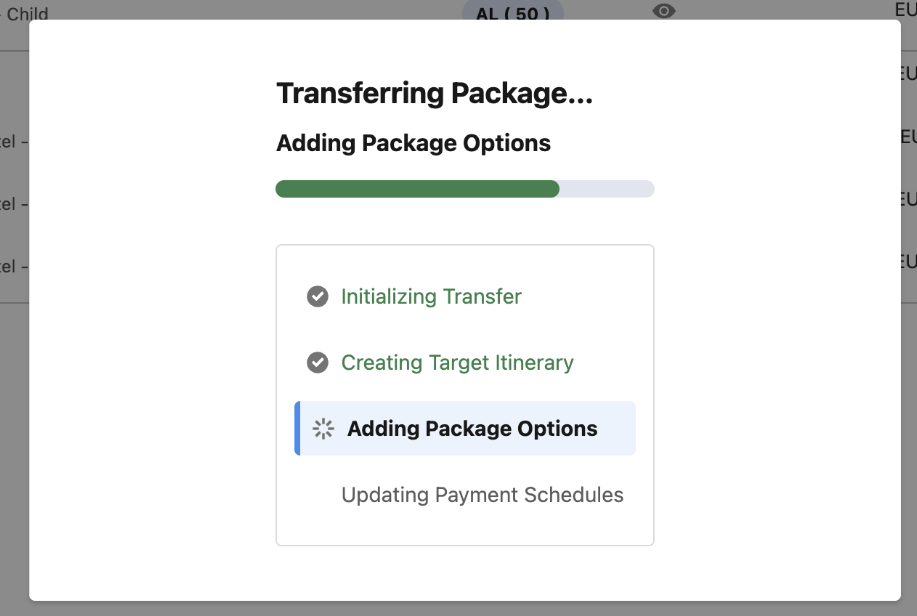
Invocable method to recalculate cancellation schedules (ST-2458)
Invocable method to recalculate cancellation schedules Cancellations New API Method: recalculateCancellationRules We've added a new API method that allows you to schedule calculation rules recalculationUsage The recalculateCancellationRules method is now available through the BookingApi callable service. ```java Map<String, Object> arguments = new Map<String, Object>{ 'itineraryId' => '{itineraryId}' }; Map<String, Object> result = (Map<String, Object>) Tauck.ServiceCall.execute('BookingApi.recalculateCancellationRules', arguments); ```
Introduce a spinner on Passengers and Payment schedule tab until loaded (ST-2440)
Introduce a spinner on Passengers and Payment schedule tab until loaded Passenger Grid, Payments A spinner was added when first opening Passengers and Payments tabs to indicate the tab is loading.
Fix Passenger Names For PNR Import (ST-2468)
Fix Passenger Names For PNR Import RightRez We added a new option to have a better name matching during auto import of PNRs. This usually happens during RightRez refresh, API use cases or after shop flights process. The issue is that the GDS does not support special characters so we need to allow better name matching. To turn it on, go to **custom settings → flight configurations → RightRez** and update Additional Features field with Name Matching. Note: You may need to add this field to the page layout for custom metadata (as it is not updated sometimes with deployments). After that you can try importing a PNR via API. Change a few letters or add a hyphen or some special character on passenger record and check if a PNR is imported with name mismatch.
Modify mode - error on too quick selection/deselection of options (ST-1830)
Modify mode - error on too quick selection/deselection of options When in modify mode of the Booking Wizard, if options were selected or deselected in rapid succession, it could trigger an error related to the inventory availability, despite the option having sufficient allotment. We have implemented a spinner for the options tab for items in allotment status to allow the status to properly update before others are available. '''
Popup not fully visible if the package line in Package Search screen is too long (ST-2124)
Popup not fully visible if the package line in Package Search screen is too long We’ve fixed a UI issue in Package Search where the Departure Status label and tooltip (e.g. Sold Out) could be partially cut off when a departure row contained a large amount of information. The expanded availability row layout has been improved with clearer structure, responsive wrapping, and updated labels, ensuring that long labels and hover popups are now fully visible and readable. This results in a more consistent and accessible experience when reviewing sold-out or constrained departures.
Change occupancy - cannot save changes on decrease occupancy when all Booking Wizard tabs disabled (ST-2143)
Change occupancy - cannot save changes on decrease occupancy when all Booking Wizard tabs disabled We have addressed an issue where users were not able to save changes when all tabs in Booking Wizard are disabled
Swap icon enabled even if there is only 1 room (ST-2161)
Swap icon enabled even if there is only 1 room We have addressed an issue where users were able to click the swap icon while having only 1 room in the booking.
Booking Wizard: When Component exists for Day but not assigned to that departure should not appear (ST-2285)
Booking Wizard: When Component exists for Day but not assigned to that departure should not appear Fixed an issue in Booking Wizard Options where days could appear in the Options day ribbon for components not assigned to the selected departure. The day ribbon now only renders days for components that have available options for the active departure, including bundled components, ensuring selectively assigned components (e.g. Helicopter) are only displayed on departures they are actually configured for.
Options Screen with Multiple Room (group/large booking) is slow (ST-2295)
Options Screen with Multiple Room (group/large booking) is slow Implemented multiple optimizations to improve performance of selections in booking wizard
Lapsed pax shown as Active in Allocations tab (ST-2322)
Lapsed pax shown as Active in Allocations tab Fixed Lapsed passengers showing in the Allocations tab
Previously selected Cabin is not indicated in reinstate modify mode (ST-2348)
Previously selected Cabin is not indicated in reinstate modify mode Previously selected Cabin is now indicated in reinstate modify mode.
Promotions_Got Promo Code not cleared on Transfer (ST-2351)
Promotions_Got Promo Code not cleared on Transfer Resolved an issue where promo codes - specifically Gift of Time - were incorrectly carried over when transferring a room to a new departure date. Previously, the promo code badge remained visible and displayed an invalid “applied to NaN room” message, despite no longer being applicable in the new allocation. The update now ensures promo codes linked to passengers removed from the current allocation are excluded, preventing misleading or orphaned promo code displays after a room transfer.
Cancelled and Invalid passengers when managing Itinerary Groups (ST-2375)
Cancelled and Invalid passengers when managing Itinerary Groups We have fixed an issue where cancelled or Invalid passengers were showing in the Other Passengers dropdown options on Manage Itinerary Groups, preventing users from saving. The Cancelled or Invalid passengers are no longer listed on the Other Passengers dropdown.
Waitlist Results - Cabin displayed in wrong order (ST-2408)
Waitlist Results - Cabin displayed in wrong order We have fixed cabin ordering in the Waitlist mode. Cabins are now correctly sorted by price, from cheapest to most expensive.
Home Airport field access issue on Guest page layout from Itinerary -> Passengers tab (ST-2415)
Home Airport field access issue on Guest page layout from Itinerary -> Passengers tab We’ve fixed an issue where editing a Contact from the Passengers grid could fail if the Contact page layout included custom lookup fields. Previously, lookup relationship fields (ending in `__r`) were incorrectly included in the dynamic field selection, causing errors such as “No such column … on entity Contact” when opening the edit dialog. The field selection logic has been updated to safely exclude relationship (`__r`) fields, ensuring Contacts can now be edited successfully from the Passengers tab even when custom lookup fields (such as Home Airport) are present on the layout.
Promotions_Promotion buttons are enabled in cancel mode & Promo Code can be applied (ST-2425)
Promotions_Promotion buttons are enabled in cancel mode & Promo Code can be applied Promotions are no longer editable during cancellation flows in Booking Wizard. Previously, when entering cancellation mode, the promotions section remained visible and fully interactive, allowing users to add/remove promotions or validate promo codes. The promotions section is now hidden when the Booking Wizard is in Cancel Room or Package (and Waitlist) mode, preventing unintended promotion changes during cancellations and aligning the UI behaviour with expected business rules.
Guest Contact saved but not assigned to the Passenger record when created during Change Occupancy (ST-2438)
Guest Contact saved but not assigned to the Passenger record when created during Change Occupancy We have fixed an issue where guest contact created during Change Occupancy wasn't assigned to the passenger record.
Transferred pax are still visible in Payments tab (ST-2454)
Transferred pax are still visible in Payments tab We’ve fixed an issue where passengers transferred to another itinerary were still visible in the Payments tab of the original itinerary and could incorrectly receive payments. Transferred passengers (and their related payment schedules) are now consistently excluded from the Payments view, alongside lapsed passengers, and cancelled passengers are hidden according to the Show Cancelled Pax in Payments setting. This ensures that only valid, active passengers appear in the Payments tab and prevents payments from being applied to passengers no longer associated with the itinerary.
Fix booking context date passed to promotion endpoint (ST-2462)
Fix booking context date passed to promotion endpoint We’ve improved how the Booking Context Date (BCD) is calculated when checking promotions in Booking Wizard. Previously, the booking date used for promotions was taken from the primary passenger and applied to all rooms. The logic has now been updated to determine the booking date per room, using the earliest effective date among the passengers in that room. This ensures promotion eligibility is evaluated accurately in multi-room and mixed-date scenarios, aligning promotion checks with actual passenger booking contexts.
Promotion pills are missing in Package Search (ST-2469)
Promotion pills are missing in Package Search As part of the ongoing deprecation of the PackageDeparture.active field, the promotion engine and snapshot ingestion logic have been updated to rely on booking_eligibility instead of the deprecated field. The promotion engine no longer excludes package departures based on active = true, and now correctly includes all departures whose booking_eligibility is not Inactive. Additionally, snapshot schema fallback logic has been hardened to safely handle NULL values for the deprecated field, preventing valid, bookable departures from being incorrectly marked inactive. This resolves an issue where promotion pills were missing in Package Search for eligible packages.
PackageAllotmentAssignment Records created through integration not displaying in Inventory Contract (Inventory Season Status) (ST-2470)
PackageAllotmentAssignment Records created through integration not displaying in Inventory Contract (Inventory Season Status) Package Allotment Support Auto-Update **Feature:** Package allotment assignments now auto-adjust the parent InventorySeasonStatus__c package support flag. **Behavior:** When PackageAllotmentAssignment__c records are added/updated/deleted/undeleted, the parent status is updated via the trigger domain: - Sets support to Selected Packages when assignments exist (unless already Package Bookings Only). - Resets to Package & Item Bookings when all assignments are removed. **Impact:** Imported or manually added package assignments now surface correctly in Booking Availability without manual updates to AllotmentPackageSupportId__c.
Fix the booking context date in reinstate and transfer modes (ST-2476)
Fix the booking context date in reinstate and transfer modes Fixed the Booking Date to be TODAY instead of the Booking Context Date in the Reinstate and Transfer modes.
Package search launched as new Contact (new Advisor with new agency/New Guest Contact), leading to error message (ST-2485)
Package search launched as new Contact (new Advisor with new agency/New Guest Contact), leading to error message Changes have been made in KTAPI to handle newly created Advisors, Guest Contacts, and Agencies more gracefully when related customer/account records are not yet available to external pricing services. Previously, launching Package Search for a newly created Advisor or Guest Contact - especially when associated with a newly created Agency - could fail with a pricing error if the underlying customer ID did not yet exist in the pricing engine due to sync issues. This resulted in a generic external supplier error and prevented users from accessing Package Search. With this change, Package Search now ignores missing customer records during price retrieval, allowing the flow to continue without error. This ensures that users can successfully launch Package Search immediately after creating new Advisors, Guest Contacts, or Agencies, regardless of whether those accounts have fully propagated to downstream systems.
Promotions_Booking Context Date_issue with swapping passengers in modify mode (ST-2493)
Promotions_Booking Context Date_issue with swapping passengers in modify mode Fixed the package-level promotions (tour and cruise components) to take into account the target occupancy room indexes to correctly apply the promotions.
Booking Wizard Pass Allotment Day Changes to Advanced Package Search API (ST-2499)
Booking Wizard Pass Allotment Day Changes to Advanced Package Search API A null pointer exception that occurred when saving a Booking Wizard reservation with low remaining inventory has been fixed by ensuring temporarily held allotments are included in the advanced package search sent to the KT API. Previously, when a user held the last available allotment, the /packages/{id}/advanced search did not account for those held units, causing the API to return “not available” and resulting in a save failure. The fix builds and passes allotment_day_changes derived from the user’s temporary holds, so held units are correctly added back to availability, aligns KT API behaviour with local inventory checks, avoids duplicate SOQL by reusing pre-fetched allotments, and prevents a potential null pointer during room option aggregation, allowing bookings with the final available units to save successfully.