Iceland - Minor (23.10)
Change Occupancy — Package Prices Missing with Low Inventory (ST-3410)
KAPI-7430 Odyssey UAT Bug [Change Occupancy CAD] Change Occupancy Fixed a bug where no package prices appeared in the booking wizard when mandatory components had low inventory in change occupancy.
Booking Wizard — Cabins Not Displayed in Transfer Mode (ST-3402)
KAPI-6436 Transfer Package to water tour(GLE 2026) - Cabin Category and also Cabin search is not visible in Booking Wizard though cabin inventory is available Booking Wizard Fixed an issue in transfer mode where no cabins were displayed after entering the booking wizard in low cabin inventory scenarios.
RightRez — Ignore Segment References Feature Flag (ST-3398)
KAPI-7582 RightRez - Feature Flag for Ignoring Fares Out of Sync Right Rez When the `IgnoreSegmentReferences` feature flag is enabled, PNR import now maps tickets to confirmed itinerary segments (filtered by configured status codes, defaulting to `HK`) rather than relying on potentially stale coupon segment references. A new `IgnoredSegmentMatching__c` checkbox on the PNR record is set whenever this fallback is used, making it visible to support teams. Default fare breakdowns now include a zero-value tax line to ensure consistent pricing structure when no stored fares are returned. The flag can be enabled by navigating to Setup -> Custom Metadata Types -> Flights Configuration -> RightRez -> Advanced Features. 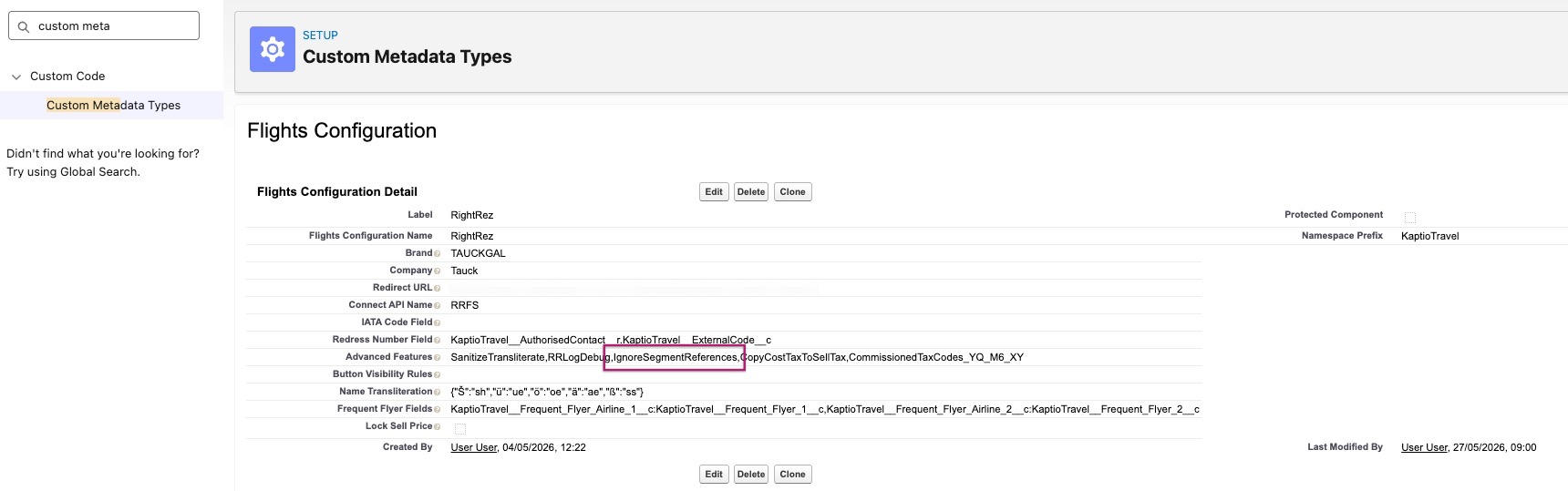
RightRez — SendToGDS Permission Removed from Default Permission Set (ST-3391)
KAPI-7160 RightRez_Send to GDS permission is part of Kaptio Flights Permission Set by default and shouldn't be Right Rez The `SendToGDS` custom permission has been removed from the `KaptioFlights` permission set.
Adjustments Tab — Improved Handling for Cancelled Passengers (ST-3380)
Adjustments tab — inactive passenger section changes Adjustments When applying adjustments to cancelled (inactive) passengers, the cancellation fee total now correctly includes all relevant charges -- previously, only active-mode itinerary lines were counted, which could cause the displayed total to be understated. Cancellation-mode itinerary lines are no longer shown as editable adjustment rows in the UI, keeping the adjustments list clean and relevant. The adjustments table also now displays context-appropriate column labels and tooltips when viewing inactive passengers: "Before" shows the cancellation fee total without NEW adjustments, "Adjustment" clarifies that a negative amount reduces the cancellation fee, and the final column is labelled "Cancellation Fee" rather than "Total Price" shows the cancellation AFTER new Adjustments have been applied. Validation messages similarly reflect the cancellation context when an adjustment would exceed the cancellation fee. 
Adjustments — Support for Negative Subtotals (ST-3373)
KAPI-6897 M2K Getting an error: Adjustments save validation failed Adjustments A new method was introduced that allows negative subtotal. ```java Map<String, Object> arguments = new Map<String, Object>{ 'itineraryId' => itineraryRecordId, 'newAdjustments' => newAdjustments, 'deletedAdjustmentIds' => new List<Id>() }; // Debug the JSON before sending System.debug('Adjustment Params being sent: ' + JSON.serialize(arguments)); if (!Test.isRunningTest()) { // Execute the service call -- opt into the ST-3373 negative-total bypass // so a negative TOWT adjustment can be persisted before the PNR import // brings in the corresponding positive prices. Object adjustmentDetails = Tauck.ServiceCall.execute( 'AdjustmentsApi.saveAdjustmentChangesAllowNegativeTotal', arguments ); // Debug the response -- `action` will echo 'saveAdjustmentChangesAllowNegativeTotal' System.debug('Adjustment Details Response: ' + adjustmentDetails); } ```
Booking Wizard — Household State Reset in Contact Search (ST-3372)
KAPI-6726 Once added a new HH member cannot add new contact outside of previous HH in Change occupancy flow Booking Wizard In Booking Wizard -- Search/Create Contact, the previously selected household no longer carries over to subsequent contact creations in the same session. Each reopen of the modal now starts from a clean state.
Adjustments Tab — Remove Button State Fix (ST-3365)
Adjustments Tab: Remove can be clicked again on existing adjustments marked for deletion, causing incorrect totals Adjustments We fixed an issue on the Adjustments tab where the remove control remained clickable after an adjustment was marked for removal. The control is now disabled while the adjustment is in a pending removal state, preventing repeated clicks on the same row.
Change Occupancy — Cabin Selection Not Clearing After Category Change (ST-3361)
KAPI-7505 Replaced Price Category not reflected in BW Booking Wizard Fixed an issue in Change Occupancy mode where the previously selected cabin was not cleared after selecting a different cabin price category in Package Search.
RightRez — IATA Code Configuration for Package Locations (ST-3357)
KAPI-6624 Send To GDS - When 2 arrival airports exist on a package use preferred airport flag Right Rez If the IATA Field API Name is defined in Flights Configuration, the system will no longer reference child transport hub locations. Instead, it will use the fields from the locations linked to the package start and end points. **Configuration:** - Add an IATA code field to the Locations setup and configure the primary airport code for each location. For example, if "London" (City Location) is used as either the Package Start or Package End location, assign its primary airport code (e.g. LHR). 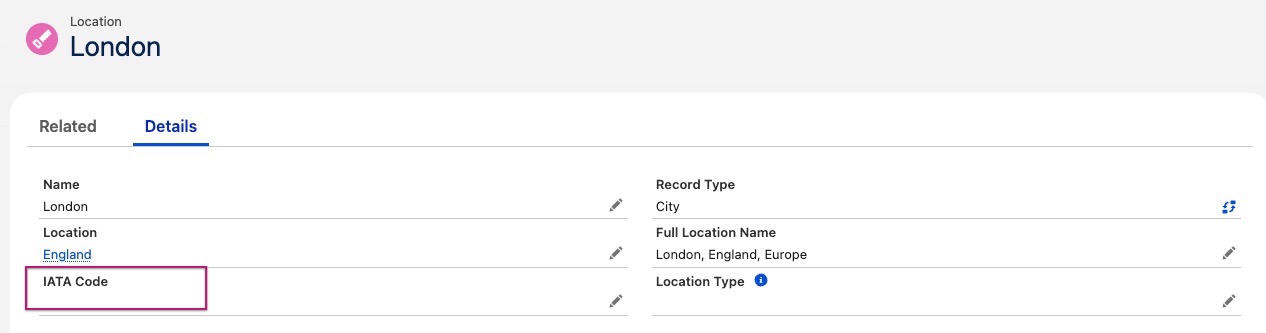 - Define the IATA code field (e.g. KaptioTravel__IATACode__c) for use in the Flights Configuration metadata. 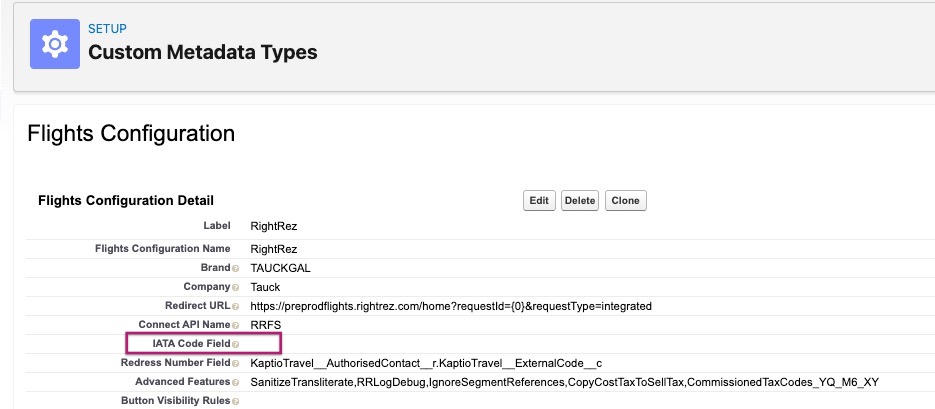  **NOTES:** - If the IATA Code field in the Flights Configuration metadata is not populated, the IATA code from the primary location or sub-locations will be used to define and populate for the Shell PNR. - If the IATA Code field in the Flights Configuration metadata is populated, and the Start or End location field on the package setup does not contain a value, the sub-location IATA code will not be sent. In this case, the user will see the following error: 
RightRez — Fare and Ticket Validation Relaxed on Feature Flag (ST-3354)
KAPI-7510 RightRez - Remove Fare and Ticket validation from PNR Import Service on Feature Flag Right Rez When the **IgnoreSegmentReferences** flag is enabled under Custom Metadata Types -> Flights Configuration -> RightRez -> Advanced Features, the system ensures the following behavior: - If no fares are returned, a zero-value fare is created using the itinerary currency. - If ticket and fare segments do not match, both are defaulted to the PNR itinerary segments (all HK segments).
RightRez — Passenger Name Sanitization and PNR Alignment Validation (ST-3350)
KAPI-6381 Shop Flights -> When RightRez is launched, it is sending names of guests with special characters, unable to proceed without editing Right Rez Two new opt-in features are available, controlled via keywords in `Advanced_Features__c` on the RightRez `FlightsConfiguration__mdt` record. Neither feature is active until the relevant keywords are added to that field. **How to configure:** Go to **Setup -> Custom Metadata Types -> Flights Configuration -> Manage Records -> RightRez** and edit the **Advanced Features** field. Enter keywords as a space-, comma-, or semicolon-separated list. Each keyword must be an exact standalone token -- e.g. `SanitizeTransliterate PnrValidationWarn`. Do not embed keywords inside longer strings. **Feature A -- Outbound name sanitization** Passenger first, middle, and last names sent to the GDS are sanitized before booking or shell PNR flows, removing characters (accents, hyphens, apostrophes, spaces) that cause GDS rejections. | **Keyword** | **Behaviour** | | --- | --- | | _(none)_ | No sanitization -- names sent exactly as stored in Salesforce (legacy behaviour) | | `SanitizeStripOnly` | Strips all non A-Z characters without first mapping accents. `Rene` -> `REN` | | `SanitizeTransliterate` | Maps accented characters to ASCII equivalents first, then strips. `Rene` -> `RENE`. Takes precedence over `SanitizeStripOnly` if both are present. **Recommended for most use cases.** | **Custom transliteration map (`NameTransliteration__c` field on the metadata record):** Optional. Accepts a JSON object with single-character source keys and string replacement values, e.g. `{"u":"ue","e":"e","n":"n","ss":"ss"}`. Only applied when `SanitizeTransliterate` is enabled. If left blank, the built-in accent removal (`TextUtils.removeDiacritics`) is used. **Leave blank to start** -- the default handles standard GDS requirements. Only configure a custom map if specific characters are producing incorrect output. **Feature B -- Inbound PNR alignment validation** When a PNR is imported (manually via LWC or Visualforce, or automatically via webhook), the system can now verify that PNR passenger data matches the mapped `Passenger__c` records before saving. | **Keyword** | **Behaviour** | | --- | --- | | `PnrValidationWarn` | Validation enabled. Mismatches are shown in the UI; the user may Continue or Cancel. Automated webhook imports log a warning and proceed. | | `PnrValidationBlock` | Validation enabled. Mismatches block the import entirely; the user must fix data and retry. Automated webhook imports raise an exception and no `PNRFlightRecord__c` is created. **Block takes precedence over Warn if both keywords are present.** | | `PnrValidationResNo` | Additional check: compares the PNR `meta.name_remark` value against `Passenger__c.ReservationNumber__c` (case-insensitive, trimmed). Only active when Warn or Block is also present. Silently passes if both values are blank. | | `PnrValidationDates` | Additional check: compares PNR flight segment departure/arrival dates against `Passenger__c.ArrivalDate__c` and `DepartureDate__c`. Only active when Warn or Block is also present. Silently passes if both SF date fields are null. | **Name comparison normalization:** PNR and Salesforce names are normalized identically before comparison -- accents are mapped to ASCII, everything except A-Z is removed, result is uppercased. `Rene`, `RENE`, and `Rene` all compare equal. `Lucas-Ford` and `LUCASFORD` compare equal. **Passport name fallback:** If `PassportFirstName__c`, `PassportLastName__c`, or `PassportMiddleName__c` is populated on a `Passenger__c` record, those fields are used for validation instead of the regular `FirstName__c`/`LastName__c`. This is intentional -- GDS bookings for international passengers are made under passport names, which may differ from the Salesforce contact name. When passport fields are present, only the passport name is a valid match. A PNR name matching the regular contact name (but not the passport name) will be reported as a mismatch. **Async webhook log format:** In Warn mode, `ApexLogger` writes a JSON entry. Search for `"PNR passenger alignment validation warning"` (or `"blocked"` in Block mode) with fields `hasNameMismatches`, `hasReservationMismatches`, `hasDateMismatches`, and a per-passenger `mismatches` array. The `"context"` field is either `"importPNR"` or `"updatePNR"`. **Recommended starting configuration for Tauck** Enable outbound sanitization first and verify names are GDS-safe before turning on inbound validation. Start validation in Warn mode to surface mismatches without blocking imports while data quality is being established. Move to Block once confidence is confirmed. Suggested initial value for `Advanced_Features__c`: `SanitizeTransliterate PnrValidationWarn` Do not populate `NameTransliteration__c` initially -- the default accent mapping is sufficient.
RightRez — Configurable Button Visibility Rules (ST-3342)
KAPI-7462 Disable Shop flights for RSC if Passenger selected is already allocated to PNR Right Rez it is possible to define multiple criteria now for disabling buttons. PNR Passenger object will trigger per selected passenger and evaluate the criteria. It is also possible to add profile based restriction as well. [{"buttons":["ShopFlights"],"objectName":"PNRPassenger__c","fieldName":"PNR__r.Cancelled__c","values":"false","profiles":["System Administrator"]},{"buttons":["FindFlights"],"objectName":"Itinerary__c","fieldName":"Status__c","values":"Confirmed"}]
Booking Wizard — Options Tab Room Configuration Fix (ST-3313)
KAPI-7178 Bedding Request with Rollaway missing on CM-2026 Booking Wizard The booking wizards options tab now correctly displays options bases on the room configuration.
RightRez — Correct Currency in Flight Shopping for Non-USD Itineraries (ST-3310)
KAPI-7342 CLONE - TC-3217 - CAD booking in USD Right Rez When shopping for flights on an itinerary priced in a non-USD currency (such as Canadian Dollars), Volare will now display and price flights in the correct currency. Previously, the currency and exchange rate were never passed to Volare, so flights were always priced in USD -- but then imported and labelled as the itinerary currency, resulting in incorrect amounts being recorded. The Shop Flights and Find Flights payloads now include the itinerary's currency code and the appropriate exchange rate, derived from the same currency book data already used elsewhere in the system. If the exchange rate cannot be resolved (for example, because currency book rates have not been configured for the business unit), the user will see a clear error message explaining what needs to be set up, rather than proceeding with incorrect pricing. No change is required for USD itineraries -- these behave exactly as before. **Action required after deployment:** Ensure the `FlightsConfiguration__mdt` record's `Advanced_Features__c` field includes the `GDSBaseCurrency_USD` token (or the appropriate GDS settlement currency). The system defaults to USD if this token is absent, but it should be set explicitly. The business unit's currency book must also include buy rates for the GDS base currency.
RightRez — Flights Header Now Shows Active and Shell PNR Counts (ST-3236)
RightRez_wrong number of active flights in the Flights tab (each active PNR = 2 flights) Right Rez The Flights section header now displays a breakdown of Active and Shell PNR counts (e.g. _Flights -- Active (2) . Shell (1)_), replacing the previous total passenger count. This gives users a clearer at-a-glance view of booking status directly from the itinerary.
Booking Wizard — Child Passenger Restrictions on Pre/Post Stay (ST-2901)
Error when deselecting service Best Dubai Hotel when Child is a pax Booking Wizard Modify package This has been resolved with an API fix to ensure child passenger restrictions are properly respected. Pre/Post stay services that do not allow children are now excluded when a child is present in the room.