Galapagos - Patch (21.26)
Kaptio is proud to present this patch release for Galapagos. This patch release was introduced to improve on minor issues with previous Galapagos releases.
Display Total Rooms Price in Package Search (ST-742)
Display Total Rooms Price in Package Search Package Search We've enhanced the Package Search Advanced (Cruise) Price Summary to include a 'Total Rooms Price' when multiple rooms are searched, displaying the combined price for all selected rooms. 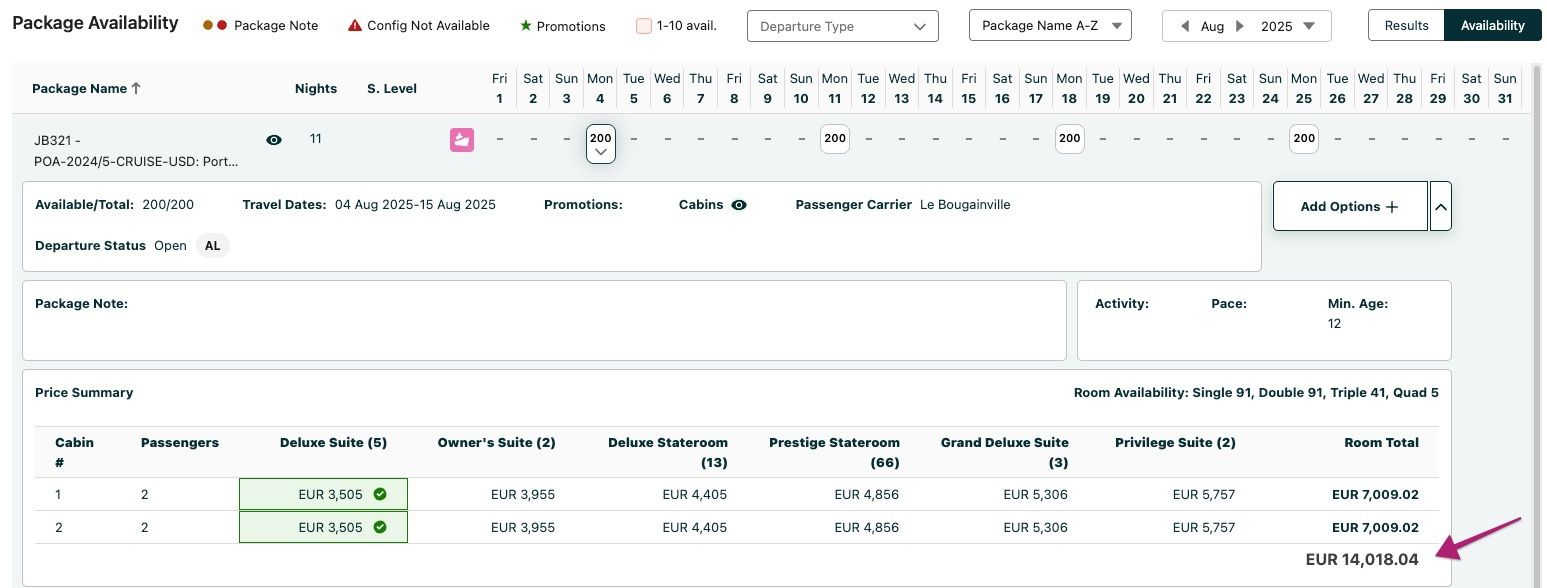 **NOTE:** The row total will not be displayed when only one room is included in the search.
Allow the Package Search Label 'Ship Name' to be configurable (ST-744)
Allow the Package Search Label 'Ship Name' to be configurable Package Search In this release, the Ship Name label displayed in the expanded Availability view of Package Search is now configurable. 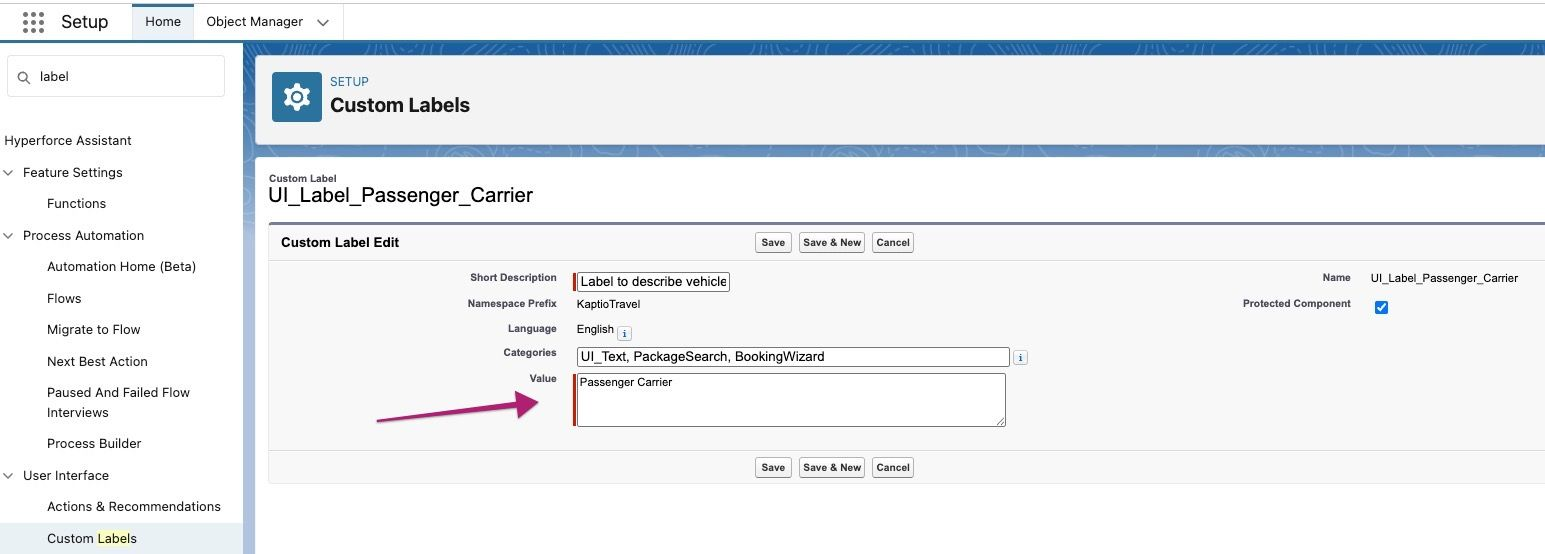 The default value is 'Passenger Carrier' but this can be changed as required e.g. Ship Name, Ship/Train Name. A new custom label has been added to allow for this to be changed, (Salesforce Settings > Custom Labels > UI_Label_Passenger Carrier). 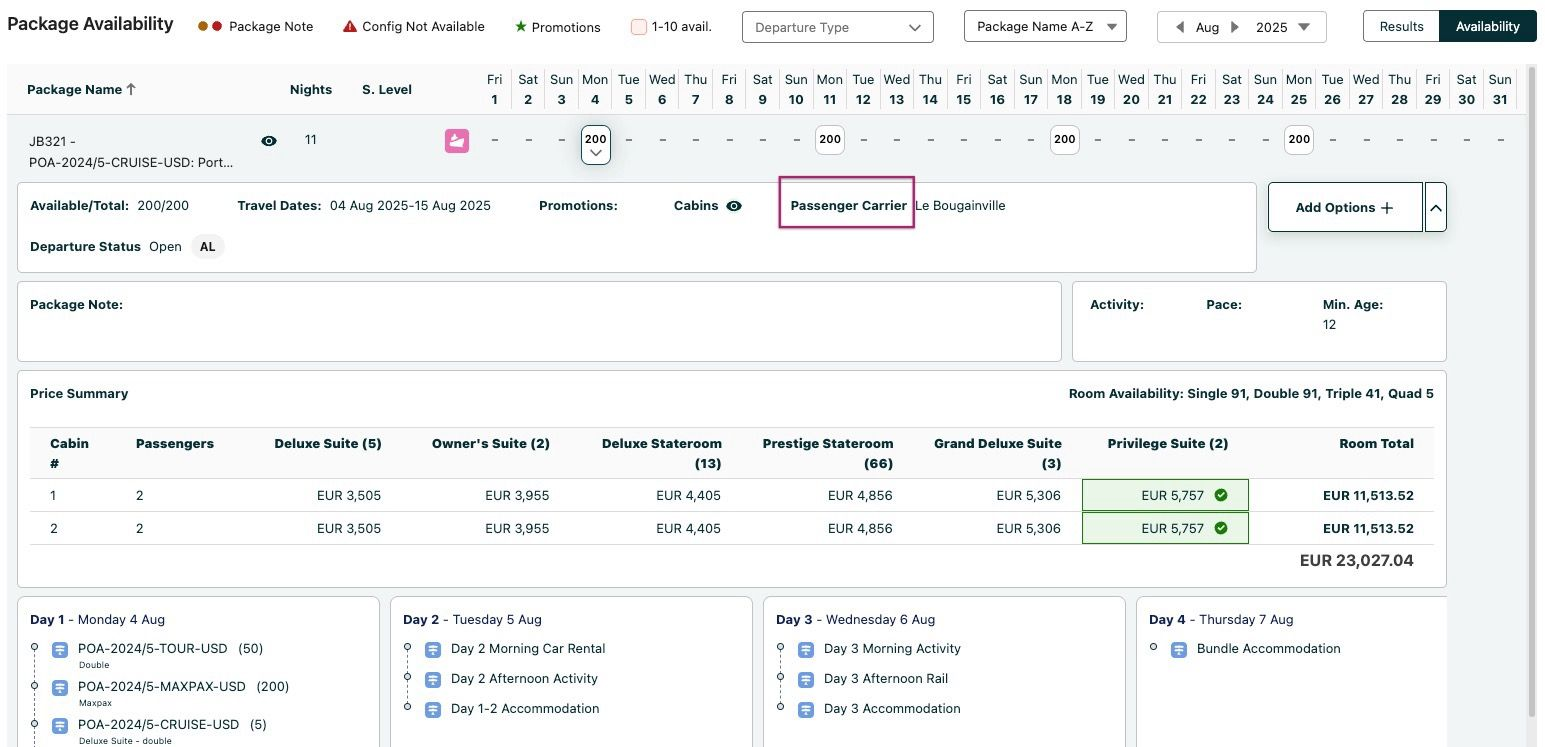
Unit Cost Pricing (ST-773)
Unit Cost Pricing Costings Tab To enable additional fields (columns) in the Costings tab and allow the users to save manual unit cost and selling prices in Lightning Costings, we are introducing a new setting: **Enable Unit Pricing in Costings**. Toggling between *true* and *false*, this setting can control the columns (and price editing possibility within Price Line modal) in Costings. Additionally, for the Itinerary Service object, two new fields are added: 1. Supplier Unit Cost - number(16,2) 2. Unit Price - number(16,2) With this setting configured as *true*, the result is as follows: - Costings Page: Custom table heading **Unit Cost** and **Supplier Unit Cost** are available for selection together with those already available under **Total Cost**. Custom table heading **Unit Price** is available for selection together with those already available under **Total Price**. - Costing Layout Modal: When PLPP is not enabled, new custom table heading **Supplier Unit Cost** is available for selection together with **Supplier Cost** (when supplier cost price is updated, the supplier unit cost is recalculated and vice versa). New custom table heading **Unit Price** is available for selection together with **Sell Total** (when sell total price is updated, the unit price is recalculated and vice versa). When PLPP is enabled, standard table heading is displayed. **How to enable:** By default, the setting Enable Unit Pricing in Costings is *false*. To see the newly added fields, the setting should be set to *true*: Custom Settings → App Settings → Enable Unit Pricing in Costings. **NOTE:** The checkbox field displays a help text: *If enabled, users will be able to save manual unit cost and selling prices in Lightning Costings.* In addition, the layout used for rendering the Costings table should be adjusted as desired: Kaptio Settings → Costings Layout → Layout applied in: 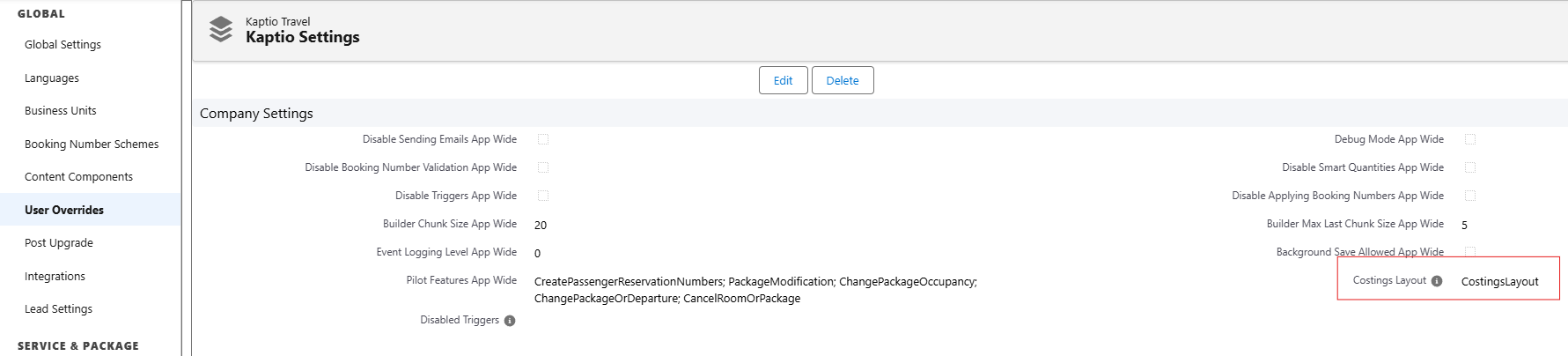 By editing the respective layout, configure the fields visible for Costings columns in Lightning layout: 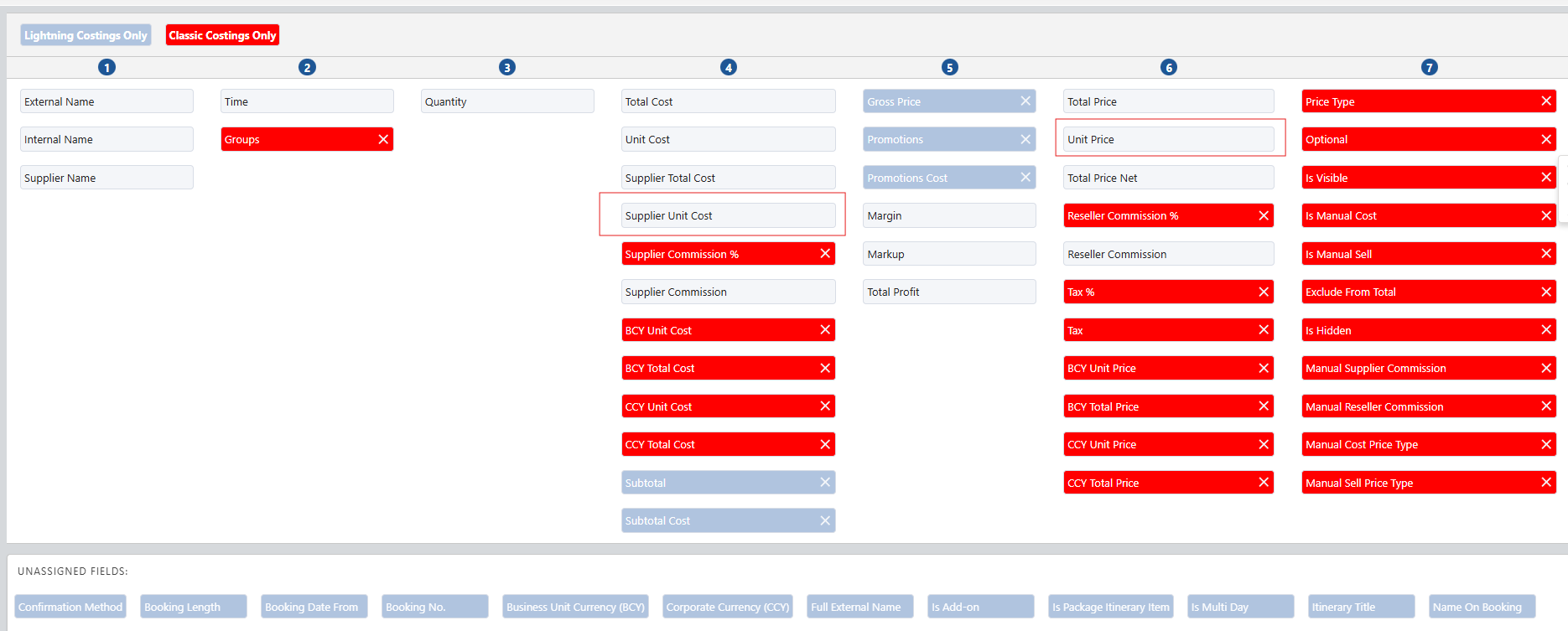 Additionally, in Custom Settings → App Settings, set the Price Line Per Passenger to *true*. **How the Feature Works:** When the setting Enable Unit Pricing in Costings is *true*, the Costings table will allow for the new fields to be selected and displayed as columns in the table: 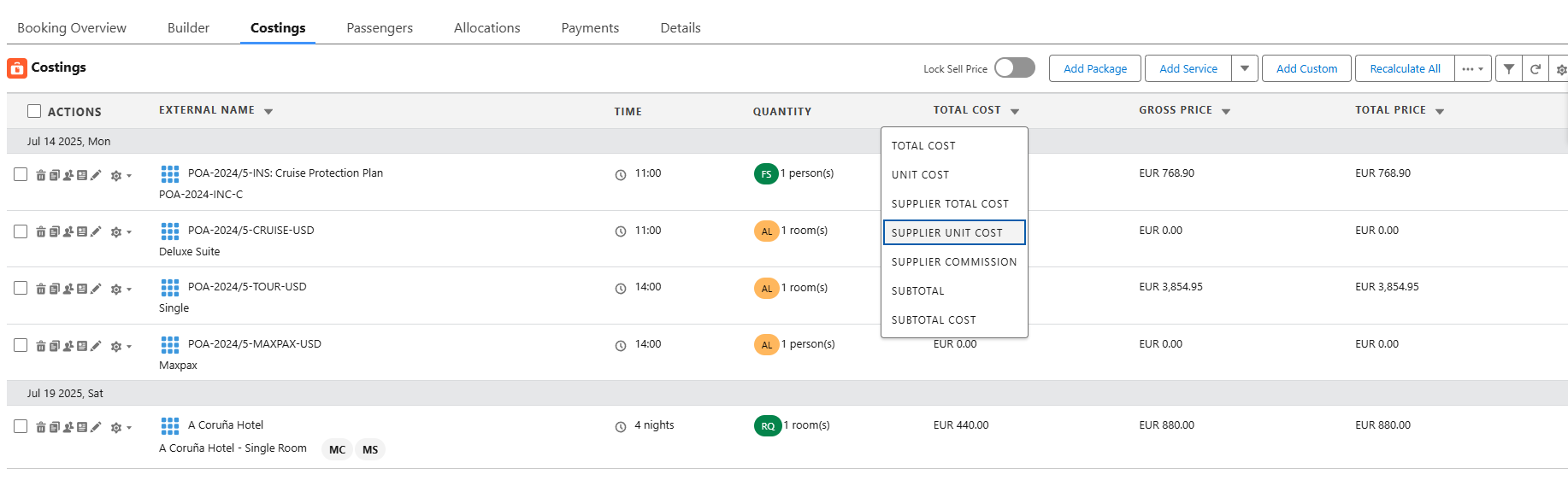 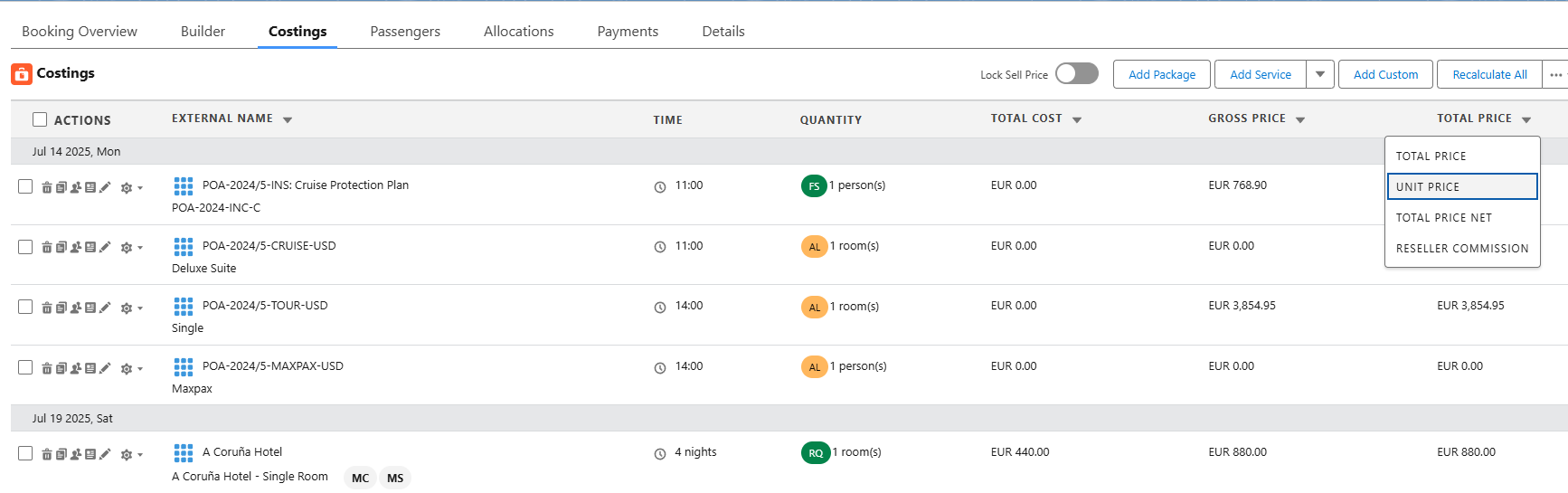 With the setting Enable Unit Pricing in Costings=*true*, the modal opened for configuring the prices manually per service line will look like this: 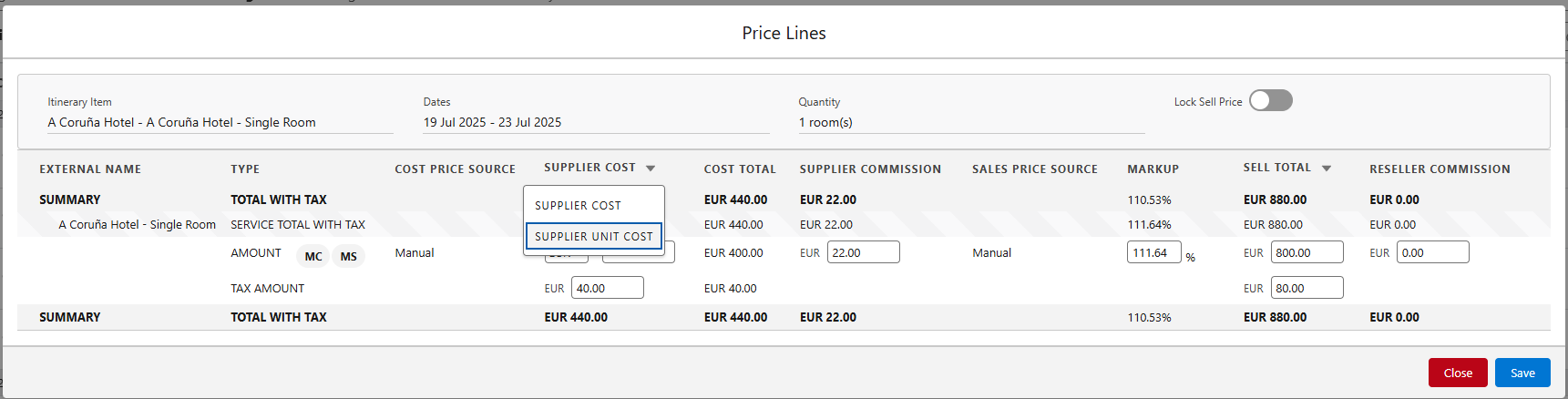 The columns can also be adjusted to show appropriate columns: 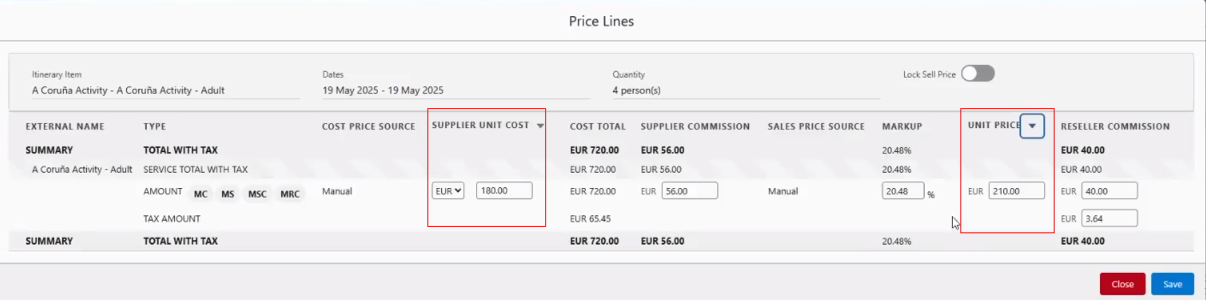 The values displayed here are the values saved in the corresponding fields on the Itinerary Service records. If the values are missing from the records, we will calculate them on the fly using the formulas below: `Supplier Unit Cost = ItineraryPriceLine__c.SupplierValue__c / (Quantity * Booking Length)` (Itinerary Price Line with Entry Type = COST) `Unit Price = ItineraryPriceLine__c.Value__c / (Quantity * Booking Length)` (Itinerary Price Line with Entry Type = SELL) Quantity and Booking Length vary as follows: - For Price Category, Meal Plan, and Fees: Quantity = `Itinerary_Item__c.Quantity__c`; Booking Length = `Itinerary_Item__c.AllocationDays__c` if Service's Pricing Type = Standard OR Booking Length = 1 if Service's Pricing Type = Booking - For Add-ons: Quantity = `Itinerary_Item__c.Quantity__c` if Add-on's Unit of Measure = unit(s) OR Quantity = `Itinerary_Item__c.AssignmentCount__c` if Add-on's Unit of Measure = person(s); Booking Length = number of days between Itinerary Service's Date From and Date To if Add-on's Allocation = day OR number of nights if Allocation = night OR 1 if Allocation = Booking **How to use:** In the Costings tab, open the modal for Price Line configuration for a selected service line by clicking the pencil icon: 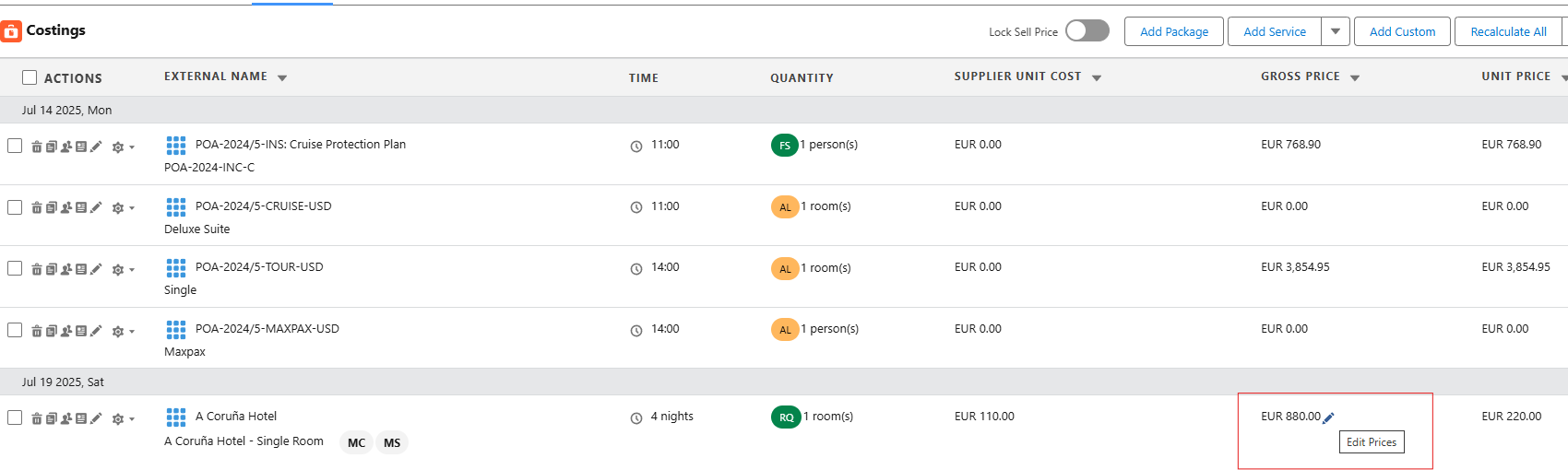 Modify the prices as desired: 1. When the user overrides the Supplier Unit Cost, we calculate the new Supplier Cost = `Supplier Unit Cost * Quantity * Booking Length`, display it in the UI and send the pricing request with this computed value. Same for Unit Price: calculate total by `Unit Price * Quantity * Booking Length`. 2. When the user overrides the Supplier Cost, we calculate the new Supplier Unit Cost = `Supplier Cost / (Quantity * Booking Length)`. Same for Unit Price when user overrides Sell Total. 3. When the user saves the Price Lines modal, we save the values of Supplier Unit Cost and Unit Price inputs in the fields on the corresponding Itinerary Service records, even if the user didn't change these values. **Restrictions:** - Supplier Unit Cost inputs should not be visible if the user doesn't have the `Can View Cost Data` custom permission. - Supplier Unit Cost inputs should not be editable if the user doesn't have the `Can Override Cost Price` custom permission. - Unit Price input should not be editable if the user doesn't have the `Can Override Sell Price` custom permission. - Supplier Unit Cost and Unit Price inputs should be disabled for Fees.
Add Modifiers batch job (KT-12910)
Add Modifiers batch job Bulk Operations This Batch Operation is used to update one or more itineraries when their package transitions from Unpriced -> Priced.
Pre/Post go-live bulk (Recheck Inventory and Recalculate) operation (KT-12911)
Pre/Post go-live bulk (Recheck Inventory and Recalculate) operation Bulk Operations This bulk job enables administrator to change package components in itineraries. This will typically be used to change pre/post stays - when more details about the package are known.
New Methods for Bulk Operations & OFSWOP +Modifier Manager (KT-12907)
New Methods for Bulk Operations & OFSWOP +Modifier Manager Bulk Operations This epic introduces two new Bulk Operations: - Package changed from `Unpriced` to `Priced`: When an itinerary's package transitions from `Unpriced` to `Priced`, running this Operation will assign prices to previously unpriced itinerary items. - Recheck Inventory and Recalculate: Enables changing of multiple itineraries' Package Components. Running this Operation will replace itinerary items, recalculate prices, payment schedule rules and cancellation rules. It will typically be used to change pre- or post-stays when more details about the package are known.
"Technical" OFSWOP Part I "move to core service enhancements" (KT-12914)
"Technical" OFSWOP Part I "move to core service enhancements" Bulk Operations This epic introduces a scheduled job that will be scheduled to run whenever a package transitions from an `Unpriced` to `Priced` state. At a time defined in custom settings, the scheduled job will run the `Package changed from Unpriced to Priced` bulk operation. As part of this bulk operation, it will set the cancellation modifier and custom cancellation date to the values defined in the `OFSWOP Setting` custom settings.
Remove validation for the date when departure restricted price item is created (KT-12800)
Remove validation for the date when departure restricted price item is created Price Manager It is now possible to save Price Item with Departure restriction set to Date and Tour Departure without providing dates.
Multiple dates assignment for departure restricted price item in the Price Manager (KT-12834)
Multiple dates assignment for departure restricted price item in the Price Manager Price Manager When multiple dates are assigned to Price Item, we're displaying Multiple Dates in Price Manager.
Add Application, app setting and custom permission (KT-12857)
Add Application, app setting and custom permission Price Manager In the Price Manager window, we have added a new tab marked "Pricing Controls" for revenue managers. **NOTE:** To enable this feature, the User must be assigned access to "Pricing Controls".
Required Pricing controls adjustments in the Price Manager (KT-12794)
Required Pricing controls adjustments in the Price Manager Price Manager Date/Effective departure is no longer required to save a Departure Restricted Price Item. Handle multiple Dates being assigned to one Price Item.
Pricing controls UI (part 1) (KT-12856)
Pricing controls UI (part 1) Price Manager We have introduced a new Pricing controls UI which allows users to set a price point by date.
Highlight a string with prices in the Pricing overview table (GTT-326)
Highlight a string with prices in the Pricing overview table Price Manager We added highlighting for price rows in the Pricing Overview table.
Lookup from Configuration to the Price Category (GTT-330)
Lookup from Configuration to the Price Category Price Manager We added the field `PriceCategory__c` to the `ItineraryConfiguration__c` object. This field will be populated when converting Price Model to Service.
Validations for Price Model when Operational Itinerary items exist (GTT-363)
Validations for Price Model when Operational Itinerary items exist Price Manager We have added validations to Price Model: - It's no longer possible to remap Tour Departure if it's linked to an Operation Itinerary. - You now can't delete Price Model configuration because there are Operational Itinerary items linked to it.
Update Sendgrid to v3 - SF part II (KT-11678)
Update Sendgrid to v3 - SF part II Sendgrid Integration We have added an update which implements OAuth2 authentication as part of the SendGrid integration via Kaptio Courier. The update includes: - Additional parameters in the **Named Credential** configuration - A new Permission Set named **Kaptio Courier.** To enable a user to send emails via Courier, they must be assigned this permission.
Adjustment Record Type (KT-12852)
Adjustment Record Type Costings As part of this epic, the creation of a `PriceCategoryType__c` record will be handled by a post-install script that runs after the initial (first) installation of the Kaptio package. For ORGs where the package is already installed, the `PriceCategoryType__c` record must be added manually or via a script. To add it **manually**: Open `Kaptio Settings` → `Service Record Types` in the sidebar, click on `Assign new Service Record Type`, select `Adjustments` from the "Service Record Type" dropdown and enter other data accordingly. To add it **with a script**: Run the script that creates a `PriceCategoryType__c` record with the following properties: `FieldSet__c` = namespace + 'PriceCategoryFields', `HasQuickAdd__c` = true, `Label__c` = 'Adjustments Type', `PluralLabel__c` = 'Adjustments Types', `RecordTypeKey__c` = 'Adjustments', `DefaultAllocationType__c` = 'booking', `DefaultCheckInTime__c` = '14:00', `DefaultCheckOutTime__c` = '14:00', `MasterServiceType__c` = 'Logistics'.
Add "Fixed Amount" Pricing Option to Promotion Effects (KT-12853)
Add "Fixed Amount" Pricing Option to Promotion Effects Promotions We have added the "Fixed Amount" option as a new value type in the promotion effects data model (API name: "Fixed").
Save Applied Promotion IDs to Itinerary Items (ST-1140)
Save Applied Promotion IDs to Itinerary Items Promotions Now, when promotions are applied, they will be saved on related itinerary items.
Display of Two +Promotions on the Availability Tab (ST-1037)
Display of Two +Promotions on the Availability Tab Promotions We have created a common component to display the list of promotions and handle the excess list case. If there are more than two promotions, the excess list is grouped into one element, the number is visible in a badge, and the list of short labels is available on mouseover. **NOTE:** You cannot see the description of those promos.
Create Modal to Check for Promo Code Eligibility (ST-579)
Create Modal to Check for Promo Code Eligibility Promotions We have created the modal to validate and add promo codes. It supports the Gift of Time promotions. **NOTE:** See the known issues section for this ticket.
Update Package__c to Introduce new Field to Distinguish if we need Cabin Selection (ST-787)
Update Package__c to Introduce new Field to Distinguish if we need Cabin Selection Booking Wizard We have introduced a new field, `PhysicalInventorySelection__c`. This defines whether the Cabin selection tab is enabled on the Booking Wizard.
Updates to Booking Wizard (ST-789)
Updates to Booking Wizard Booking Wizard Updating Booking Wizard to handle new field on Package - Physical Inventory Selection properly.
Update passenger room selection (ST-1126)
Update passenger room selection Booking Wizard We have updated Booking Wizard; Gift of Time promotions will now be applied after creating a new itinerary from booking wizard.
Update Booking wizard price summary (ST-1127)
Update Booking wizard price summary Booking Wizard Booking Wizard Modify mode will now support and reflect applied Gift of Time promotions.
Disable Cabin Tab in Booking Wizard (ST-738)
Disable Cabin Tab in Booking Wizard Booking Wizard The Booking Wizard now supports two configurable Cabin Selection Modes to accommodate different Tour Operator requirements; **Cabin Number Selection Mode** & **Cabin Type Selection Mode** - In **Cabin Number Selection Mode:** The Cruise tab remains visible and selecting a specific cabin is mandatory - ideal for operators like Tauck. - In **Cabin Type Selection Mode:** The Cruise tab is hidden, cabin number selection is not required, and a cabin category is auto-assigned in the background. This update ensures a more flexible booking experience without impacting Package Search or core Booking Wizard functionality.
Summary Panel Changes (ST-792)
Summary Panel Changes Booking Wizard We have updated the summary panel where Physical Inventory Selection on a Package is set to not Mandatory. Now, the cabin information will only contain Cabin Description and Cabin Type.
Remove Dependency on ContentEncryption Endpoint when Changing Confirmation Status on Itinerary Items (ST-1006)
Remove Dependency on ContentEncryption Endpoint when Changing Confirmation Status on Itinerary Items Itinerary Builder We have removed dependencies on the Confirmation Status endpoint and `ContentEncryption`; `ContentEncryption` is now only required when `EncryptContentParameters__c` is enabled in app settings. KAPI-3390
Remove Missing ID Document Alert when an ID is selected at the Passenger level (ST-1124)
Remove Missing ID Document Alert when an ID is selected at the Passenger level Passenger Grid We have updated Kaptio to now dispatch an event when the `PassengersGrid` successfully saves. The event `KaptioComponentBroadcastMessage` is dispatched with details including action: 'data-refresh', objectsAffected: ['Passenger'], parentId, source: 'lwcPassengersGrid', and operation: 'passenger-save-completed'. A PoC component is provided which catches this event by listening for the `KaptioComponentBroadcastMessage` event on the window object in `connectedCallback` and removing the listener in `disconnectedCallback`. KAPI-3239 KAPI-3519
Allow other Service Record Types to show the Cruise Price Summary (ST-866)
Allow other Service Record Types to show the Cruise Price Summary API This pitch allows other Service Record Types to behave like the traditional cruise "type", and require a physical inventory selection. Enable this by checking the `EnableAdvancedPriceSummary__c` field on the `PriceCategoryType__c` object.
Setup Custom Permissions (ST-1059)
Setup Custom Permissions API Part of a larger piece of work to introduce a new Tab called "Adjustments" to the Kaptio Wizard Application allowing users to make pricing adjustments to passenger itineraries. New **Custom Permissions** have been introduced to support granular access control for upcoming Adjustments functionality: - `AdjustmentsCanEdit` - allows editing of all adjustments except inactive passengers - `AdjustmentsCanEditInactivePax` - specifically grants permission to edit inactive passengers - `AdjustmentsCanOverrideCommission` - enables toggling of the commission checkbox A corresponding **Permission Set** named **"(Kaptio) Adjustments"** has been created to group these permissions.
Cancellation fee not displayed for cancelled pax (ST-1228)
Cancellation fee not displayed for cancelled pax API We have updated the Canx Apex calculation to support fee calculations. We also updated the Picklist Value of the `ValueType__c` field in the `ItineraryCancellationRule__c` object.
Create PriceLineFactory Service for Unpriced Item Record Generation (ST-1149)
Create PriceLineFactory Service for Unpriced Item Record Generation API We introduced enhancements: - We added logic to create basic service records for itinerary items without services to ensure all unpriced package components are handled correctly. - We optimized pricing logic by skipping external API calls when no `PriceSeason__c` records exist and generating unpriced service records instead.
New object - Allotment Day Departure Assignment (GTT-323)
New object - Allotment Day Departure Assignment API We created a new object, `AllotmentDayTourDepartureAssignment__c`, with the fields `AllotmentDay__c` and `TourDeparture__c`.
New object for Crew Members (GTT-396)
New object for Crew Members API We have created new object, `CrewRequirement__c`, which stores the data related to Crew Members.
Price Summary Cabin Types to display in price ascending order (ST-1125)
Price Summary Cabin Types to display in price ascending order Package Search We have changed Price Summary. Now it will sort Cabin Types by price in ascending order. Currently the Cabin Types display alphabetically on the Cruise Price Summary on Package Search, which means that the Cabin Type names must be adjusted in order for it to display in a pre-set order. We have changed the default ordering to Order by price, from lowest to highest: 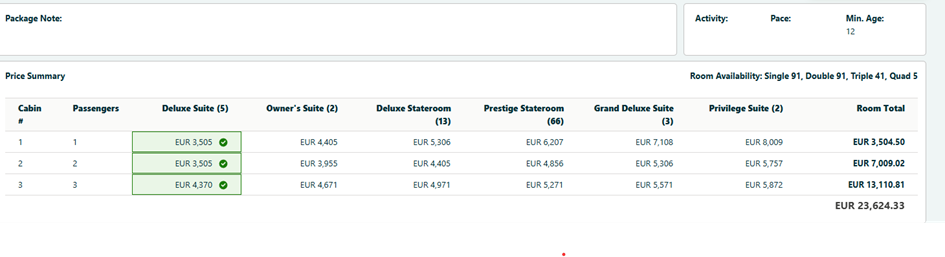 In the above example, the search was performed for 3 rooms (single, double and triple) and the prices, in terms of their order, match for all the rooms. If some rooms have different prices, the order will consider the first line (first room):  If 2 or more cabins have the same price, the order will default to alphabetical order:  **NOTE:** The items may appear out of alphabetical order because we display the value from the `KaptioTravel__ShortDescription__c` field, while the sorting is actually based on the `Name` field. For Unpriced packages, the order will default to alphabetical order: 
Remove check onSave that checks if Cabins have been Selected (ST-790)
Remove check onSave that checks if Cabins have been Selected Package Search When Physical Inventory Selection on a Package is set to Not Mandatory or Hidden, the cabin tab will not display and the error "not all cabins selected" will not display on the list view.
Booking Transfer Defaults to Quote Status (ST-1085)
Booking Transfer Defaults to Quote Status Itinerary Builder We fixed an issue where, when an Itinerary has status Booked and payment has been taken, carrying out a Transfer causes the new Itinerary to revert to Quote Pending status. With this fix, the new Itinerary created will have the same status as the original Itinerary.
Display internal service and price category name in the Group Builder (GTT-399)
Display internal service and price category name in the Group Builder Itinerary Builder Group Builder now displays the internal Service Names, rather than Full External Names. KHELP-11923
Conversion wizard - Null Pointer for the new Tour departure (GTT-371)
Conversion wizard - Null Pointer for the new Tour departure Tours We have added an error message, which will appear when some Price Model Outputs are missing for some combinations. The error reads: `Price Model conversion failed for one or more configurations. Please ensure that all combinations of configuration, group size, and tour departure have prices defined. To resolve this, use the "Calculate Prices" button on the Pricing Overview tab for the selected Price Model.`
Add list of Subtrip to the Combo Tour Details tab (GTT-380)
Add list of Subtrip to the Combo Tour Details tab Tours We have added a Subtrip list to the Combo Tour Details tab.
Show existing Combo Tour departures list (GTT-381)
Show existing Combo Tour departures list Tours We have made the following changes in Combo Tour: - **Renamed Tab:** The "Create Combo Departures" tab has been renamed to "Combo Tour Departures" for clarity. - **Auto-Load Departures:** Users no longer need to search for subtrips - existing Combo Tour Departures now load automatically on the tab. - **Subtrip Selection Restricted:** In the "Search Group Tour" modal, the order of subtrips is now fixed and cannot be modified if there are existing Combo Tour departures, ensuring data consistency.
Change for O/G filters in Combo Tour table (GTT-382)
Change for O/G filters in Combo Tour table Tours In the Combo Tour table, we have upgraded the range setting. By replacing one o/g filter field with two filters, each part of the range section can have any selection from -5 to 5. Previously, a range could only be `-3,3` or `-5,5`, now the range can be set to values like `0,3`.
Departure modal changes: Language field pre-population (GTT-383)
Departure modal changes: Language field pre-population Tours Made Language field non-mandatory on New Departures modal.
Group Size fields changes on Tour Departures (GTT-384)
Group Size fields changes on Tour Departures Tours We have added automatic pre-population to `Max Pax` and `Min Pax` fields and made them non-mandatory.
Handle conversion wizard error when both Tour Departures and Travel Periods exist (GTT-403)
Handle conversion wizard error when both Tour Departures and Travel Periods exist Tours When a Price Model has both Tour Departures and Travel Periods, Tour Departures will now be ignored during conversion, as PM only has Travel Periods.
Data model changes for Operational Itineraries (GTT-208)
Data model changes for Operational Itineraries Data Model We made some data model changes for future Operation Itineraries logic. **NOTE:** After installation, add the new Picklist value `Operations Pending` to the Itinerary Item Mode field to enable this change.
Main Table component (Inventory LWC) (GTT-338)
Main Table component (Inventory LWC) Lightning Components We have implemented the Main Table component in Inventory LWC.
Hide/show columns in Inventory LWC (GTT-339)
Hide/show columns in Inventory LWC Lightning Components We have added the logic to hide/show columns in Inventory LWC.
Prefill search filters in Inventory LWC with SF Flow (GTT-340)
Prefill search filters in Inventory LWC with SF Flow Lightning Components We have added a prefill filter which can be created by Admin users. When creating a flow (similar to the package search flow): The Flow is based on itinerary record, the Group Tour id is queried as a step in the flow, and the Group Tour id is then passed as filter value to the Lightning Web Component.
Combo Tour support in Inventory LWC (GTT-341)
Combo Tour support in Inventory LWC Lightning Components We have added the following automatic prefilters for Combo Tour Inventory LWC: - **Date**: Only show records >= today. - **Group Tour**: Prefill with linked Subtrip IDs. - **Allotment Days**: Display only those tied to Combo Tour Departures. Combo Tour Departures now appear in the main inventory table.
Pagination for the main table in Inventory LWC (GTT-348)
Pagination for the main table in Inventory LWC Lightning Components We have implemented 2-level pagination for the Inventory Main Table.
Add Lightning page for Operational Itinerary (GTT-362)
Add Lightning page for Operational Itinerary Lightning Components We have added a Lightning page for Operational Itinerary.
Search filters backend (Inventory LWC) (GTT-342)
Search filters backend (Inventory LWC) Lightning Components We have implemented the backend of the Inventory Table filters.
Main Table backend (Inventory LWC) (GTT-343)
Main Table backend (Inventory LWC) Lightning Components We have implemented the backend of the Inventory Table.
Search filters frontend (Inventory LWC) (GTT-346)
Search filters frontend (Inventory LWC) Lightning Components We have implemented the search filters frontend (Inventory LWC).
Main Table frontend (Inventory LWC) (GTT-347)
Main Table frontend (Inventory LWC) Lightning Components We have implemented the frontend of the Inventory table.
Add validation to the Discounted Pax modal (GTT-368)
Add validation to the Discounted Pax modal Price Model We have added validation to the Discounted Pax modal. **NOTE:** Group Size End should be not greater than 9999.
Conversion Wizard - add warning when Discount for the current period already exists (GTT-386)
Conversion Wizard - add warning when Discount for the current period already exists Price Model We added a warning to Service Conversion Wizard; The error will appear when a user is reconverting a Price Model for a period which already has discount pax rules and discounts.
Update KT-API error handling for Price Model calculation (GTT-387)
Update KT-API error handling for Price Model calculation Price Model We have updated the KT-API error handling for the calculation endpoint in Price Model Outputs.
Update Price Season naming (GTT-388)
Update Price Season naming Price Model We have updated Price Season naming in Travel Date conversion. Now, all Price Season names contain their Start & End date for clarity.
Price Model Conversion - reuse existing Price Seasons (GTT-389)
Price Model Conversion - reuse existing Price Seasons Price Model We have updated Price Seasons in Price Model. Now, when the new dates match the existing Price Season dates, it reuses Price Seasons dates for the Travel Date conversion.
Price Seasons - Pricing Overview filter update (GTT-391)
Price Seasons - Pricing Overview filter update Price Model Added Pricing Overview filter updating.
Update KT-API error handling for Price Model calculation (Price Seasons) (GTT-400)
Update KT-API error handling for Price Model calculation (Price Seasons) Price Model We have updated KT-API to handle errors called when calculating the endpoint for Price Model Seasons.
Cruise/Rail + Timetable data model changes (GTT-431)
Cruise/Rail + Timetable data model changes Rail We have updated the `Cruise/Rail + Timetable` data model, creating several new objects and updating existing ones. **After install, switch to Salesforce Classic in order to delete the metadata:** - Manually Delete `ReservedAllotment__c.ServiceDepartureLocation__c`, `ReservedAllotment__c.CabinType__c`, `ReservedAllotment__c.InventoryContract__c`, `ServiceDeparture__c.Route__c`, and `ServiceDepartureOpsLocation__c.ServiceDeparture__c` from subscriber's Orgs. - Manually delete the `RouteDepartureLocationAssignment__c` custom object from subscriber's Orgs.
Incorrect inventory status on live services after merging amendment (KT-11158)
Incorrect inventory status on live services after merging amendment API Resolved an issue where live services lost their API inventory status after merging an amendment. Previously, merging caused live itinerary items to re-query inventory from service records rather than retaining their original live (API) inventory. With this fix, live services consistently preserve their API inventory status after amendments are merged, ensuring accurate inventory display and consistent booking information. KHELP-11132
Add Gate to Disable Hiding Manually Created Payment Schedules (ST-1214)
Add Gate to Disable Hiding Manually Created Payment Schedules API We have updated `ItineraryPaymentsService` to gate the addition of payment schedules. Now all payment schedules will be added, even if pax were cancelled. **NOTE:** This will happen, **UNLESS** the Itinerary was created through Booking Wizard.
Issue with price lines on live services in Cancellation mode (KT-12782)
Issue with price lines on live services in Cancellation mode Cancellations Sell Cancellation Price Lines will no longer be duplicated after cancelling a live service with the `Unconfirmed Cancellation` status. KHELP-11753 KHELP-11789
Ordering of deposit payment schedules is broken when adding a new manual payment schedule with earlier due date (KT-12931)
Ordering of deposit payment schedules is broken when adding a new manual payment schedule with earlier due date Payments When a manual payment schedule rule is added, the order of rules is now properly respected.
Live rail items are deleted unexpectedly (KT-12780)
Live rail items are deleted unexpectedly Rail Resolved an issue where editing or re-searching a single live rail segment in an itinerary caused all related segments to be deleted without warning. The updated behaviour now loads the rail search with all related segments displayed together, allowing users to review and modify all linked segments at once. When saved, a new rail itinerary is created with updated search parameters, ensuring all segments remain consistent and bookings stay under the same PNR. KHELP-11695
Issues with itinerary item notes (ST-445)
Issues with itinerary item notes Itinerary Builder We fixed an issue where itinerary notes were not being saved or updated when adding new services or modifying existing services in the Builder. This affected users with NewBuilderSave enabled. The notes will now be saved and updated in this scenario. KHELP-11625 KHELP-11664
Unable to create itinerary for some of the packages (ST-891)
Unable to create itinerary for some of the packages Itinerary Builder Fixed an issue where component options were throwing errors incorrectly, preventing a user from continuing to Booking Wizard to complete a booking. KAPI-3338
Transfers - no Channel and Currency fields in Package search screen (ST-628)
Transfers - no Channel and Currency fields in Package search screen Package Search We fixed an issue where the Package Search was not displaying the Currency and Channel fields.
Price lines not created when a package is unpriced (ST-945)
Price lines not created when a package is unpriced Package Search We fixed an issue where price lines were not being created for unpriced and core components that belonged to an unpriced package. Now, this functions as intended.
Expand Icon on Package Search not displaying (ST-1232)
Expand Icon on Package Search not displaying Package Search We fixed an issue with Package Search: the "expand" icon was missing on the Availabilities Screen when a row was expanded. Now, it is still displayed even when a row is expanded.
Pre/Post stay options do not respect room index (ST-910)
Pre/Post stay options do not respect room index Booking Wizard We have fixed an issue where pre and post stay options would not split by room. Now, this functions correctly, and the room index is respected.
GOT - UI discrepancies (ST-980)
GOT - UI discrepancies Booking Wizard We have updated the UI to address a few minor issues related to Promotion support in Booking Wizard.
Selecting a contact without the Account selected throws an error (ST-969)
Selecting a contact without the Account selected throws an error Booking Wizard We fixed an issue where it was possible to skip the selection of an Account in the Primary Contact Modal when launching Booking Wizard from Package Search. This was allowed in error, so the Account selection is now "required," and cannot be skipped.
Booking overview - Clicking on CANCEL button in Cancel Rooms/Package popup is still navigating to booking wizard (ST-975)
Booking overview - Clicking on CANCEL button in Cancel Rooms/Package popup is still navigating to booking wizard Booking Wizard Fixed an issue where clicking the **CANCEL** button in the **"Select Room/s to Cancel"** popup incorrectly navigated the user to the Booking Wizard's Passenger tab. The popup now closes as expected when the **CANCEL** button is clicked, maintaining the correct user flow within the cancellation process. KAPI-3451
The promotion labels are different across the application (ST-1014)
The promotion labels are different across the application Booking Wizard We resolved minor discrepancies in promotion pill labels.
Payments Tab | Passengers listed alphabetically instead of by Room (ST-1070)
Payments Tab | Passengers listed alphabetically instead of by Room Booking Wizard We have updated the Payments Screen to address a listing error; passengers are now listed first by room, then alphabetically. I.e. Passengers will be listed in a room, wherein they will be listed alphabetically. KAPI-3574
Change occupancy from doubles to a single and triple does not observe mandatory options being preserved (ST-1102)
Change occupancy from doubles to a single and triple does not observe mandatory options being preserved Booking Wizard We have addressed an issue, when in Change Occupancy Mode (COM) and swapping cancelled pax with new pax the mandatory selection error wasn't reset. This prevented the changes being saved without first unselecting and then reselecting mandatory options. Now, this is no longer the case.
Blank bubble displayed when there's no promo description (ST-1015)
Blank bubble displayed when there's no promo description Promotions We fixed an issue with the promotion tooltip. Previously, it was displayed even if there was no description text. Now, it functions as intended.
GOT applied to both pre/post depending on the number of nights selected (ST-1034)
GOT applied to both pre/post depending on the number of nights selected Promotions We addressed the issue of Gift of Time applying to both pre and post lines in error. This was fixed by improving the logic in the summary section.
Able to change package/departure for water tour from booking overview tab when the flag is set to false (ST-1045)
Able to change package/departure for water tour from booking overview tab when the flag is set to false Booking Overview We have fixed an issue where the **Transfer** button was incorrectly displayed in the **Booking Overview** tab for **Water Tours**. Previously, users were able to access the **Change Package or Departure** flow via the Transfer button, despite it being unavailable in the **Builder** tab. The Transfer option is now correctly **hidden for Water Tours**, preventing unintended changes to package or departure. KAPI-3485
Package Price is zero in Modify Mode for first rendering (ST-1051)
Package Price is zero in Modify Mode for first rendering Booking Overview We addressed an issue where the Package Price wasn't populated correctly when going into Booking Wizard in Modify Mode. KAPI-2895
Create Departure modal - the "Departure Status" field label is missing (GTT-236)
Create Departure modal - the "Departure Status" field label is missing Package Departure `Departure Status` was missing as a Field label. It has now been added and marked as required.
Generated combo tour departures should be loaded under the Tour Departures tab without refreshing the browser (GTT-351)
Generated combo tour departures should be loaded under the Tour Departures tab without refreshing the browser Tours We fixed an issue where combo tours were not loaded in the Tour Departures tab without refreshing the browser. This was fixed by adding a data refresh after creating tour departures.
Selected date range is not removed after resetting the filter then save (GTT-353)
Selected date range is not removed after resetting the filter then save Tours We fixed an issue where resetting the filter and saving would not remove the selected date range.
Re-conversion - "Use same conversions for Sell Prices" option incorrectly populates Sell Prices config (GTT-357)
Re-conversion - "Use same conversions for Sell Prices" option incorrectly populates Sell Prices config Tours We fixed a bug where, when different Based On configuration is selected during the Cost and Sell steps, and a user clicks "Use same conversions for Sell Prices," it would produce an incorrect Based On population.
Override Margin/Markup field is saved on recalculate action (GTT-393)
Override Margin/Markup field is saved on recalculate action Price Model We removed the save values on the Margin/Markup field to prevent issues during recalculation.
DML 10001 in conversion wizard (GTT-404)
DML 10001 in conversion wizard Price Model We fixed an error causing a `Too many DML rows: 10001`. The error was caused converting a large PM several times and creating prices for the new period. Converting one more time by clicking `Recalculate Prices` would throw the error. Now, the conversion functions as expected.
Expand button for inventory contract search has no use (GTT-424)
Expand button for inventory contract search has no use Price Model We have added logic to hide expand button if there are no expandable services in group.
Proper error message should be displayed in UI if any validation is there when going to attach generated departures to a price model in Combo Tour (GT-434)
Proper error message should be displayed in UI if any validation is there when going to attach generated departures to a price model in Combo Tour Price Model We have added a custom error message to signal validation issues when connecting generated departures to a price model in Combo Tour. Previously, validation errors would occur with no error message.
Handle null object error for empty configuration for price seasons (GTT-441)
Handle null object error for empty configuration for price seasons Price Model We fixed an error during conversion process. If any least one combination of `Itinerary Configuration` + `Price Season` + `Group Size` had no price, the service conversion was failing. Now, the service conversion functions as expected.
Incorrect PDF output on published content (KT-12736)
Incorrect PDF output on published content Documents Previously, when an itinerary content item was published without an associated PDF-type KObject record, the generated PDF could incorrectly reflect live itinerary data instead of the state at the time of publishing. This led to discrepancies in client-facing documents, especially if itinerary items were edited post-publication. This fix ensures that, in the absence of a stored PDF snapshot (KObject Type = 2), the system now falls back to the static HTML saved on the itinerary content, preserving the accuracy of published content. KHELP-11740